Azure OAuth
Odoo requires a specific Microsoft Azure app registration to send and receive emails via Outlook 365 using OAuth authentication.
Setup in Microsoft Azure Portal
Create a new application
1 Go to the Microsoft Azure Portal. Log in with your Entra ID account.
2 Navigate to App registrations and click (+) New registration.
3 Name it Odoo MailDesk. Select Accounts in any organizational directory and personal Microsoft accounts.
Configure Redirect URI
4 Under Redirect URI, select Web and enter:
https://yourdomain.odoo.com/microsoft_outlook/confirmAPI Permissions
Odoo needs permissions to read (IMAP) and send (SMTP) emails.
- Click API permissions -> (+) Add a permission.
- Select Microsoft Graph -> Delegated Permissions.
- Add:
SMTP.SendandUser.Read, User.ReadWrite. 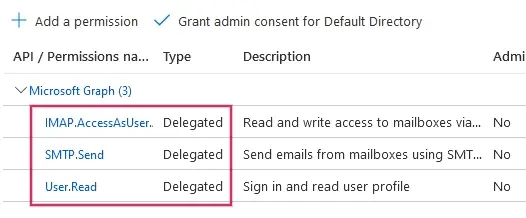
Create Credentials
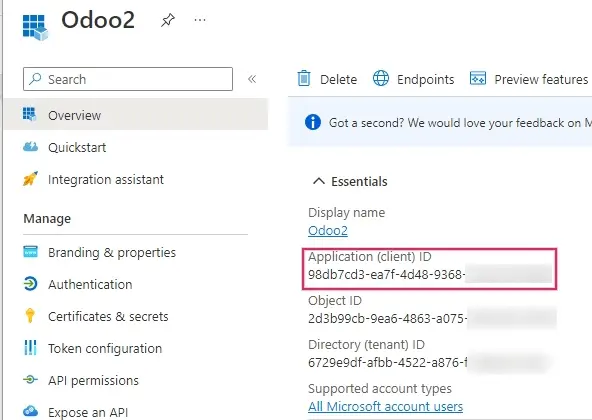
5 From the Overview page, copy the Application (client) ID.
6 Go to Certificates & secrets -> Client secrets -> (+) New client secret.
7 Copy the Value immediately. It will be hidden later.
Setup in Odoo
1 Install the Microsoft Outlook module.
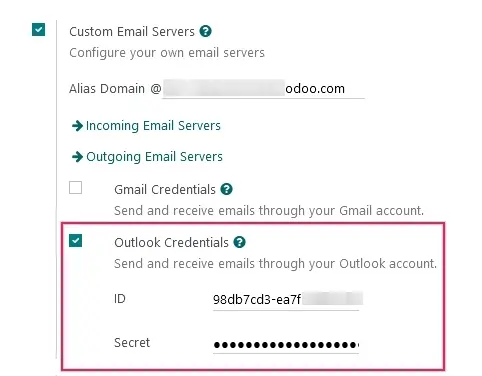
2 In Settings > General Settings, enable Custom Email Servers and paste your Client ID and Secret.