
Skip to Content
Git Delivery — Monthly subscription
Subscriptions

Git Delivery — Monthly subscription

50+ countries

Every new version of your Metzler IT modules arrives in your Git repository as a commit — on its own branch, ready to review and merge.

  • Odoo.sh, GitHub, GitLab and Bitbucket
  • Your branches stay untouched
  • Billed monthly, cancel monthly
Monthly, cancel monthly: 39.00 €
Prices excl. VAT
Invalid email
Your Odoo modules, delivered by Git

Running Odoo from a Git repository — on Odoo.sh, on your own server or with a hosting partner? Then every new version of your Metzler IT modules arrives there by itself, as a commit on a branch of its own. You review it and merge it. No downloading, no unpacking, no copying folders by hand.

Set up in about 5 minutesNew versions within the hour€39 a month · cancel monthly

Three steps, once

You set it up once in your customer account. From then on, every new version arrives by itself.

1

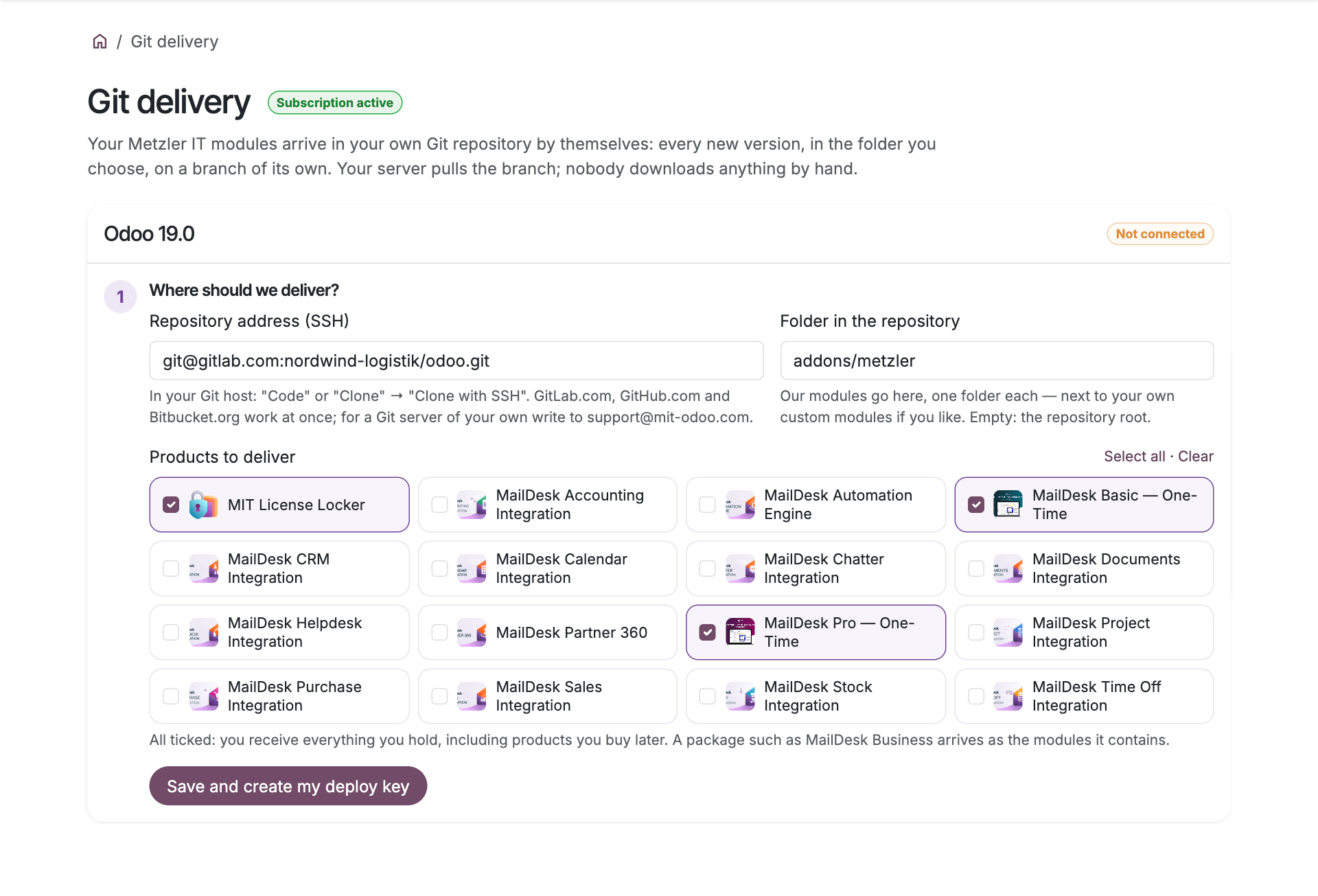
Tell us where to deliver

In My account → Git delivery, paste your repository's SSH address, choose the folder for our modules (for example addons/metzler) and tick the products. Leave them all ticked and you also receive the products you buy later.

Git delivery in the customer portal: repository address, folder and products
2

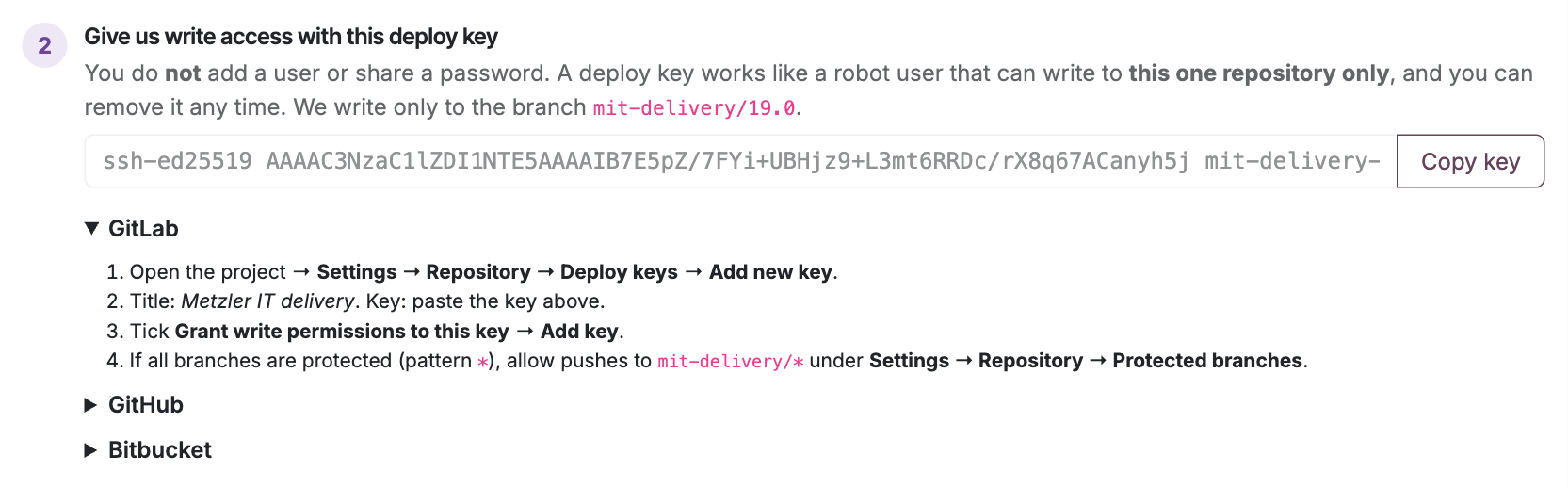
Add the deploy key

We create a key for your repository. Add it in GitHub or GitLab as a deploy key with write access (on Bitbucket: to a separate user). A deploy key opens this one repository only, and you can remove it any time. No user account, no password.

The deploy key with Copy key and the steps for GitLab, GitHub and Bitbucket
3

Check and deliver

One click checks the connection and queues the first delivery. After that, every new version we publish arrives within the hour, and you get a short e-mail.

The check succeeded: the repository answered and the first delivery is queued

Step-by-step guide with screenshots for GitHub, GitLab, Bitbucket and Odoo.sh: Set up Git delivery →

What arrives in your repository

We write to one branch of our own. Your branches stay exactly as they are.

main                        # your branch, unchanged
mit-delivery/19.0-2026-11-05 # ours: one commit per product
  addons/metzler/
    maildesk_mail_client/
    maildesk_mail_client_pro/
    mit_lycense_locker/
    .mit-delivery/          # delivery notes

tag  mit-delivery/19.0-2026-11-05/2026-11-05-014353
  • ✓Your own branch stays untouched. We write only to mit-delivery/ plus your Odoo version and the day the delivery was set up, for example mit-delivery/19.0-2026-11-05.
  • ✓You decide when. Open a merge request into your branch, review it, merge it. It shows only our modules and the Python libraries they need.
  • ✓Clean replacements. Each delivery replaces a product's folders completely, so files a new version no longer ships do not linger.
  • ✓A dated tag for every delivery, so you can go back to an earlier state.
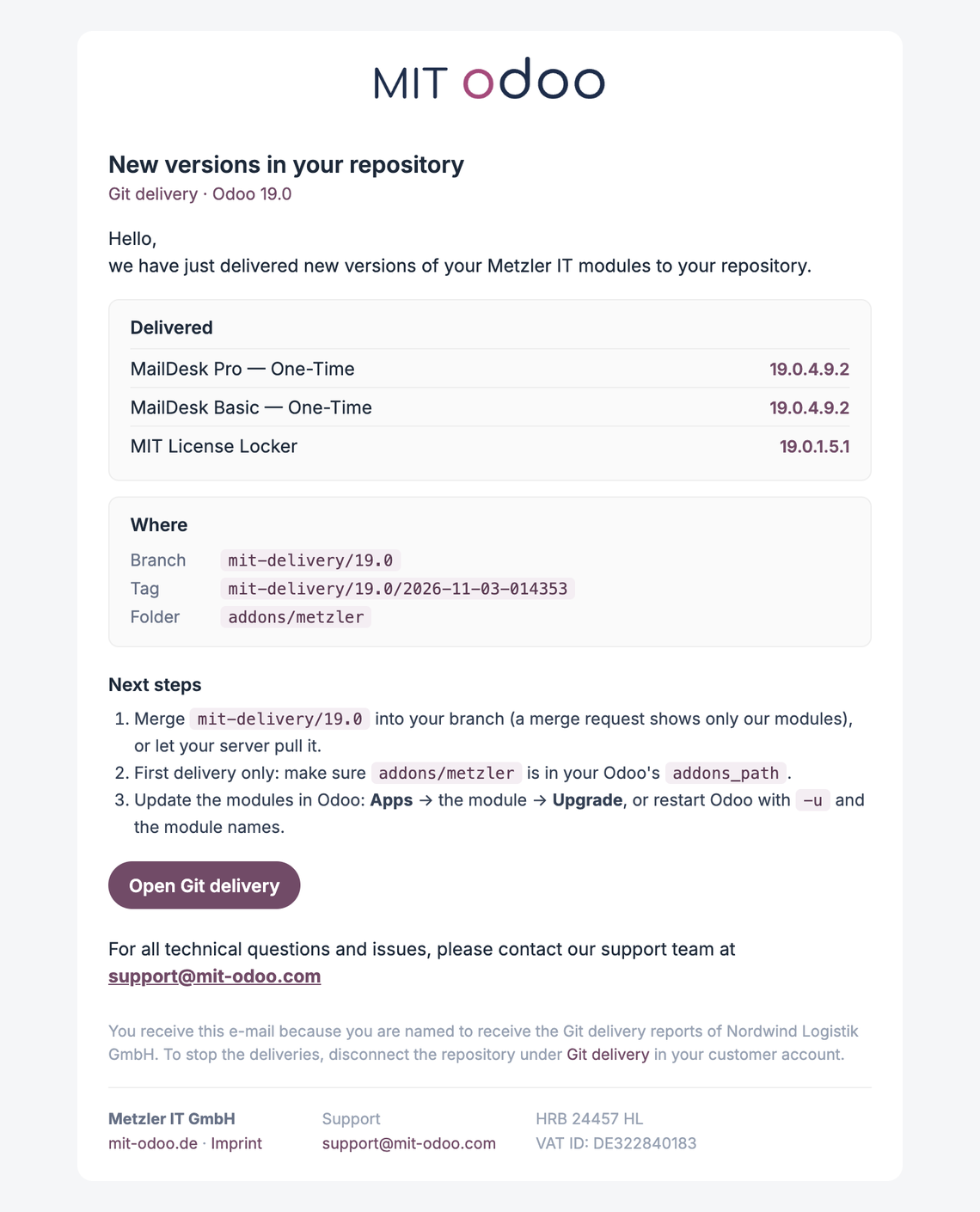
The e-mail after a delivery

After each delivery: which products, which versions, branch, tag and folder.

What it saves — with our real release numbers

We publish fixes and improvements often. That is good for you — as long as someone brings them into your Odoo.

20+

new versions of MailDesk Pro for Odoo 19 from May to October 2026 — three to four a month

25+

days with new module versions for a MailDesk Business installation in the same six months

€39

a month for your whole company and every product you hold — cancel monthly

By handWith Git Delivery
Notice the new versionCheck the portal or wait for the release mailIt arrives within the hour, with an e-mail
Get the filesSign in, download, unpackNothing to do
Put them into the repositoryReplace folders by hand, commit, pushAlready a commit on mit-delivery/19.0-2026-11-05
ReviewCompare copied foldersA merge request with only our modules
Go backFind the old archiveCheck out the dated tag

By hand, someone on your team or at your Odoo partner repeats these steps whenever a new version comes out — for a MailDesk Business installation that was about once a week. With Git Delivery each new version is a commit in your repository within the hour, done the same way every time. For €39 a month — usually less than one hour of a developer's time.

Release numbers: our published versions for Odoo 19, May to October 2026.

Built so that nothing surprises you

Git Delivery writes code into your repository, so it is built to be predictable.

Your branches stay yours

We never write to main or any other branch of yours — only to mit-delivery/… and its tags.

One key, one repository

A deploy key per repository. No user account, no password — remove the key and the access ends.

Review before it goes live

Nothing reaches your Odoo until you merge. The merge request shows only our modules, delivery notes and the Python libraries they need in your requirements.txt.

Always traceable

Every commit is authored by Metzler IT Delivery <[email protected]>; the delivery notes record which files belong to which product.

Back to any state

Every delivery gets a dated tag. If your Git host refuses tags, the delivery still arrives.

Follows your licences

Only the products you hold a licence for are delivered — the ones you buy later too, if all are ticked.

Good to know

What you need

  • ✓A repository on GitLab.com, GitHub.com (also behind Odoo.sh) or Bitbucket.org. For a Git server of your own, write to [email protected].
  • ✓A licence for the Metzler IT products you want delivered — Git Delivery brings them to you, it does not replace the licence.
  • ✓Permission to add a deploy key to the repository.
  • ✓One subscription covers your whole company and every Odoo version you hold products for.

What it does not do

  • —It does not merge into your branches — you decide when a new version goes live.
  • —It does not touch your database: after the merge you update the modules in Odoo as usual.
  • —It does not deliver Odoo or third-party modules — only Metzler IT products.
  • —It does not run on an unpaid invoice: deliveries pause and continue by themselves once it is paid.

Questions and answers

Does it work with Odoo.sh?

Yes. Odoo.sh builds from a GitHub repository: add the deploy key in the GitHub repository your Odoo.sh project is connected to, not in Odoo.sh.

Can you change our production branch?

No. We write only to mit-delivery/ plus your Odoo version and the set-up date, and to its dated tags. Only what you merge reaches your branch.

Do we have to give you a user or a password?

No. On GitHub and GitLab you add a deploy key with write access to this one repository. Bitbucket's access keys can only read, so there you add the key to a separate user, for example metzler-delivery.

How fast do new versions arrive?

Within the hour after we publish them. You receive a short e-mail listing the products, versions, branch, tag and folder.

What happens if we cancel?

Deliveries stop at the end of the current billing month. Everything already in your repository stays there, and your licences are not affected.

Which products are delivered?

All Metzler IT products you hold for that Odoo version — for example MailDesk Basic, Pro or Business and the License Locker — or only the ones you tick. A package such as MailDesk Business arrives as the modules it contains.

Stop copying modules by hand

€39 a month, excl. VAT. Billed monthly, cancel at the end of any month.