
Skip to Content
MailDesk Basic - Monthly subscription
  • No SaaS · runs inside your own Odoo
  • Your mail & data stay in your database
  • Works with Odoo 17 · 18 · 19 · 20 - your choice
  • Continuously updated — 16 modules, 12 workflow bridges
Subscriptions

MailDesk Basic - Monthly subscription

50+ countries
MD-BASIC-MON

MailDesk Basic brings Gmail, Microsoft 365 and IMAP into one inbox inside Odoo. Read, write, search and organise emails, work with shared mailboxes and keep your conversations together.

Includes incoming email synchronisation. Two-way sync, AI assistance and the 12 Odoo workflow integrations are available in higher editions.

Monthly: 29.00 €
  • Version
Prices excl. VAT · choose your Odoo version below
Invalid email
MAILDESK BASIC · ODOO 17 · 18 · 19 · 20

Your team’s email, right inside Odoo

MailDesk turns Odoo into a real email client for Gmail, Microsoft 365 and any IMAP mailbox: one inbox for every mailbox, shared team mailboxes, and every mail next to the contact it belongs to.

Gmail & Google WorkspaceMicrosoft 365 & OutlookAny IMAP / SMTP serverOdoo Community & Enterprise
▶  Watch MailDesk in action
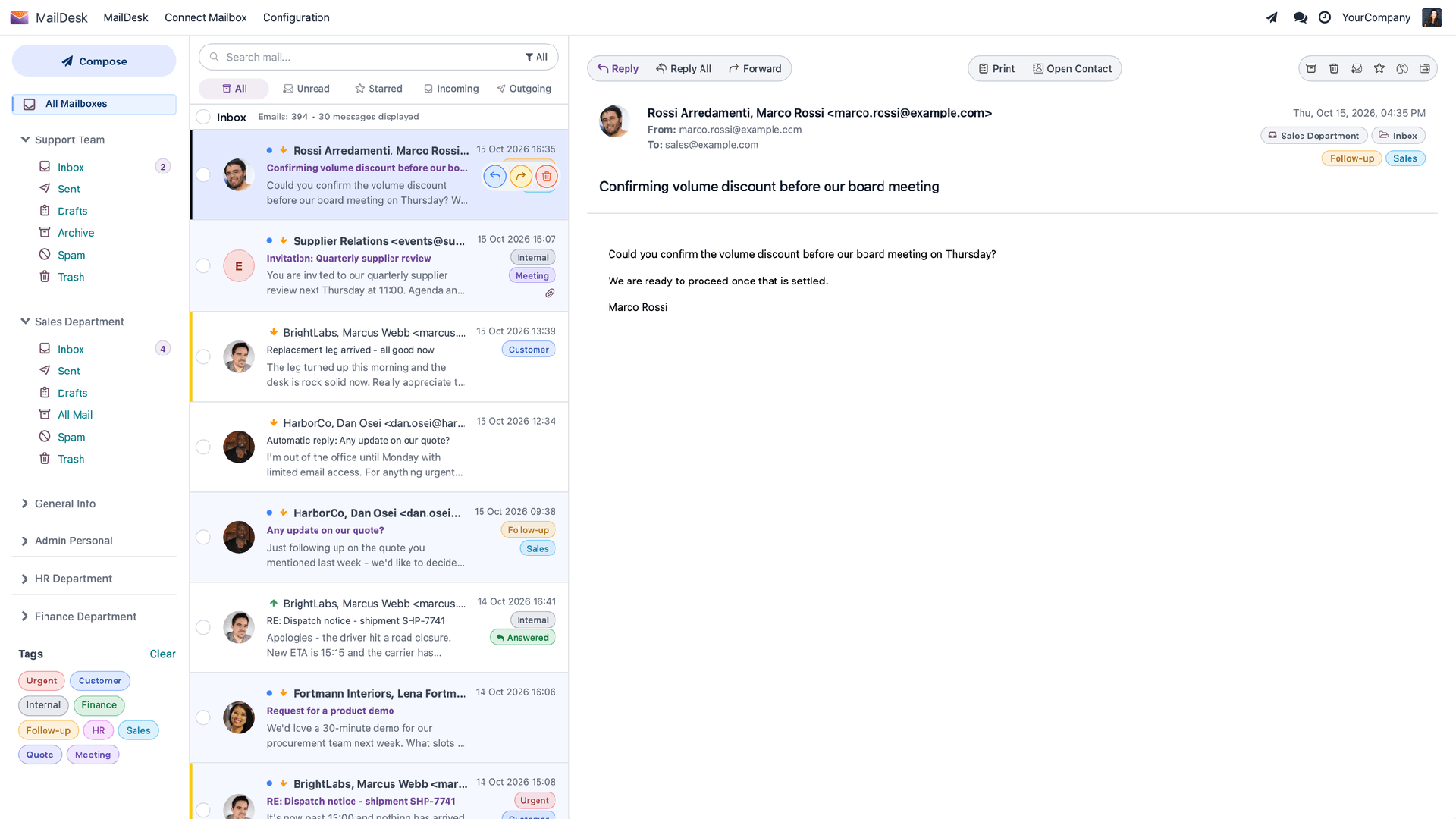
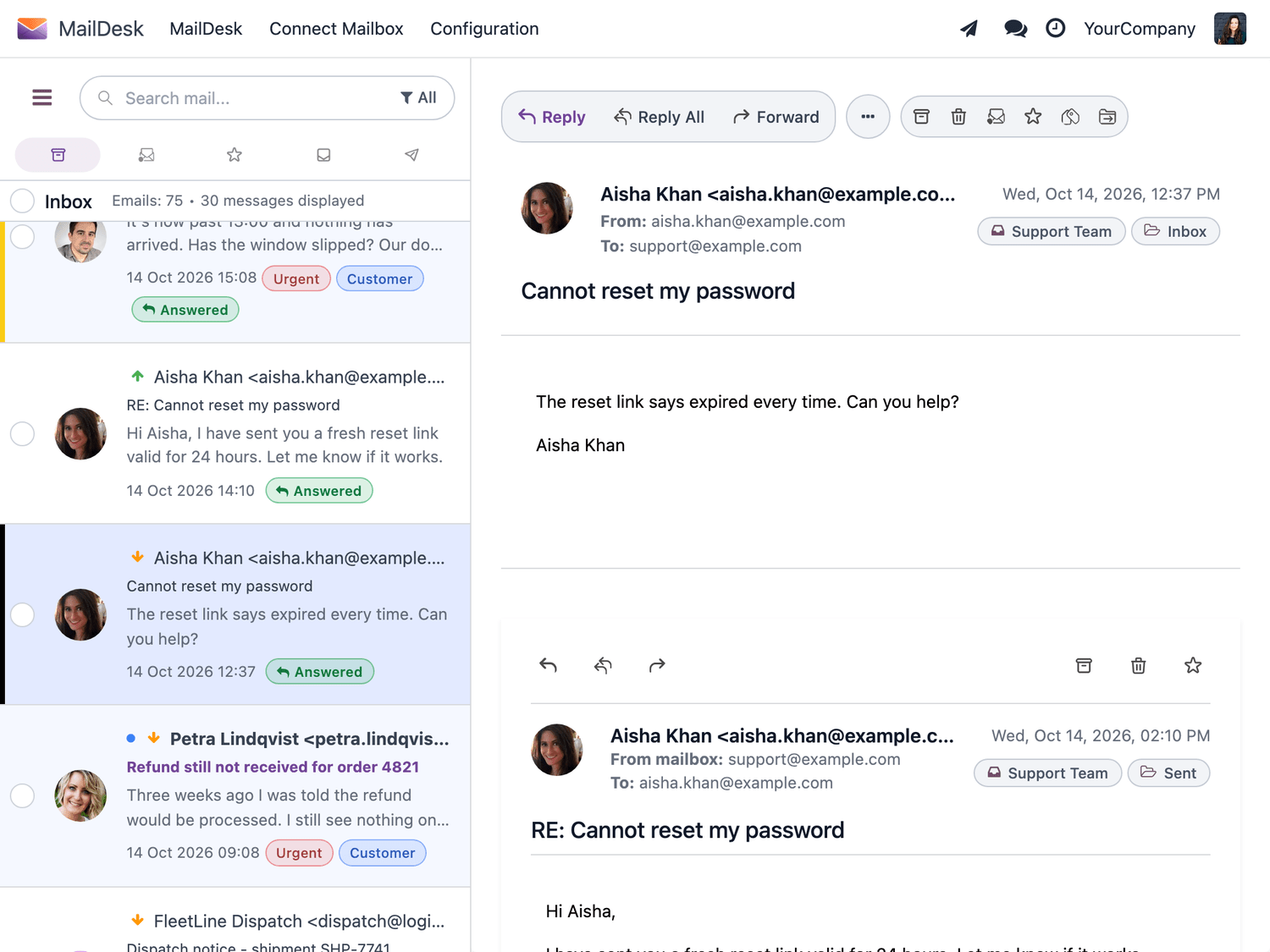
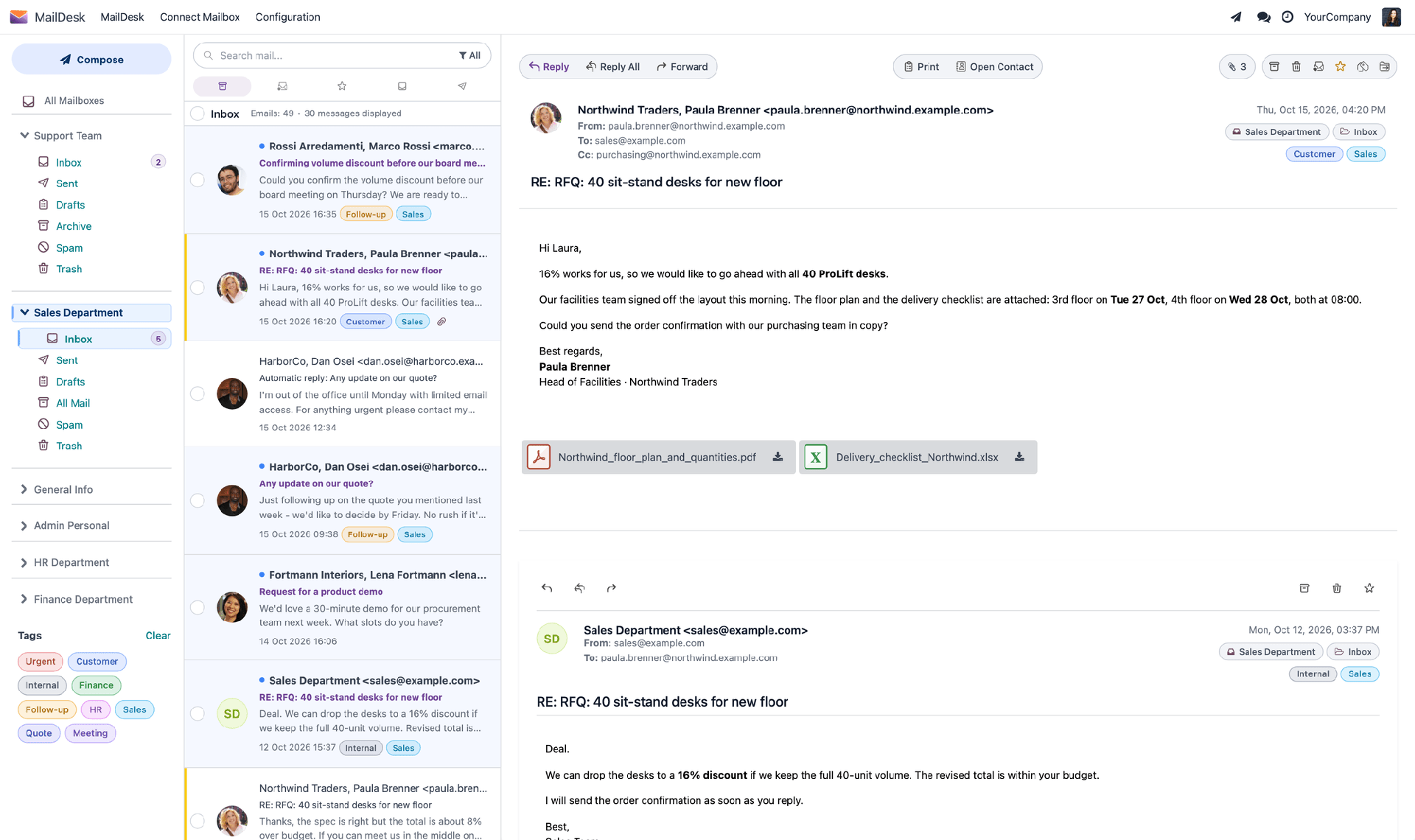
MailDesk inbox inside Odoo with a customer conversation open
BOP AllianceBuilt by Metzler IT, Solution Partner in the Integrations category of the BOP Alliance (Best Odoo Partners).

Why teams switch to MailDesk

No second mail program, no copying mails into Odoo, no guessing who already answered.

One inbox for every mailbox icon

One inbox for every mailbox

Read all your mailboxes together or one by one, with folders and unread counts.

Made for teams icon

Made for teams

Share info@ or support@ with the people who need it. Everyone sees what was answered, and by whom.

Next to your customers icon

Next to your customers

MailDesk recognises the sender as an Odoo contact, opens the contact in one click, or creates it.

Stays in your Odoo icon

Stays in your Odoo

Your Odoo talks to your mail provider directly. Each mailbox is visible only to the users you choose.

More than Odoo’s own email

Odoo sends mail from records and posts replies in the chatter. MailDesk adds the mail client around it: your whole mailbox, for the whole team.

 Odoo’s own emailMailDesk
Read and write a whole mailbox, all folders, inside Odoomail posted on records only✓
One inbox across several mailboxes—✓
Shared team mailboxes with access per user—✓
Conversations, tags, filters, search by sender—✓
Gmail and Microsoft 365 sign-in, IMAP and SMTPto fetch and send✓
Mail stays where your customers are: contacts, one click awayon records✓
01UNIFIED INBOX

All your mailboxes, one calm inbox

Open All Mailboxes and read sales@, support@ and your own mailbox in one list, newest first. Or pick one mailbox and work through its folders.

✓  Folders with live unread counts✓  One click for Unread, Starred, Incoming or Outgoing✓  “Answered” shows who replied, and when
All mailboxes in one list
02WIDE LIST

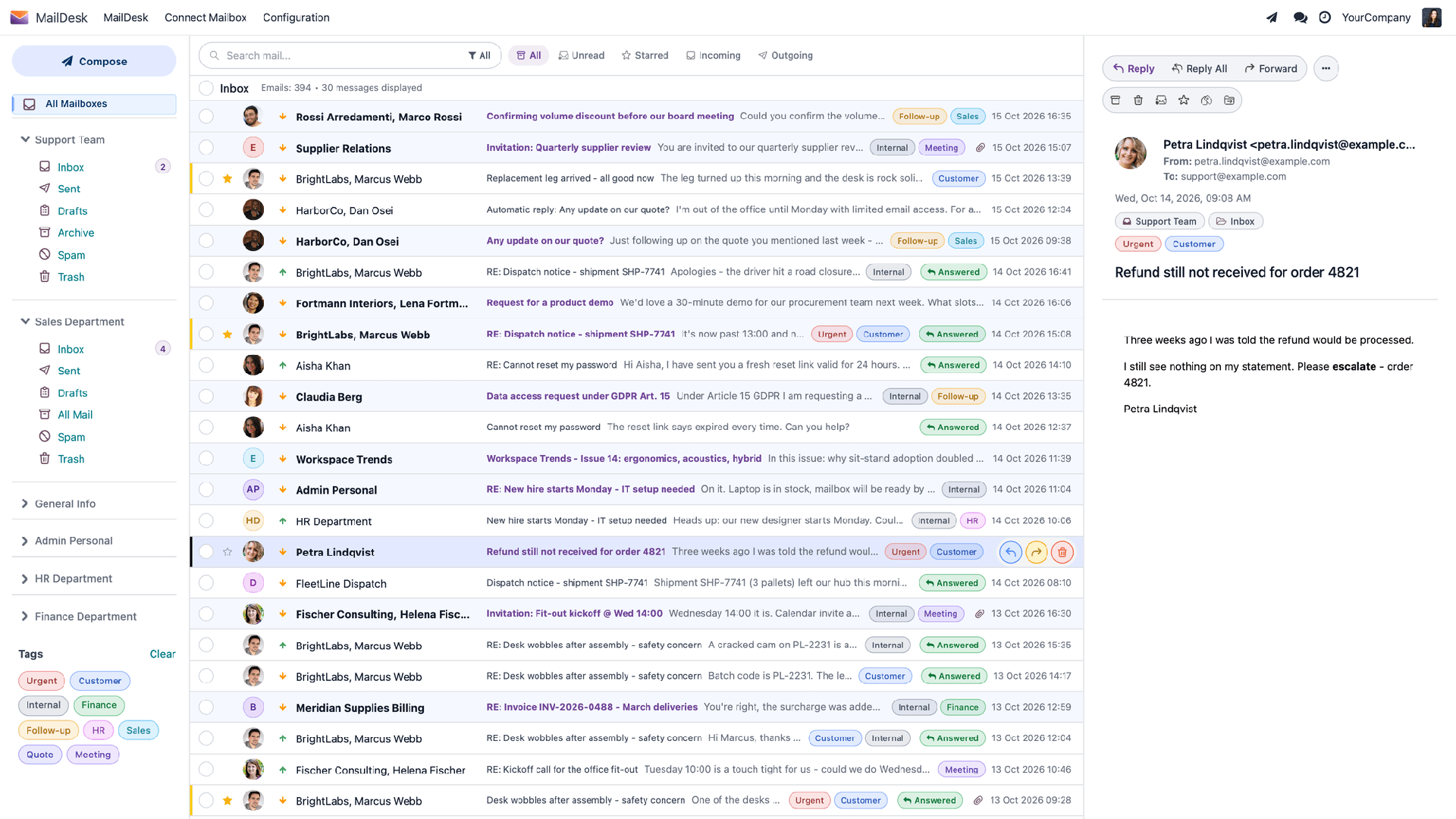
Widen the list, get a table

Drag the divider to make the list wider and it turns into a clear table: sender, subject with preview, tags, status and date, in columns you can resize. MailDesk remembers how wide you like it.

✓  Made for working through a busy team mailbox
The mail list as a table with resizable columns
03WRITE

Write like in your favourite mail app

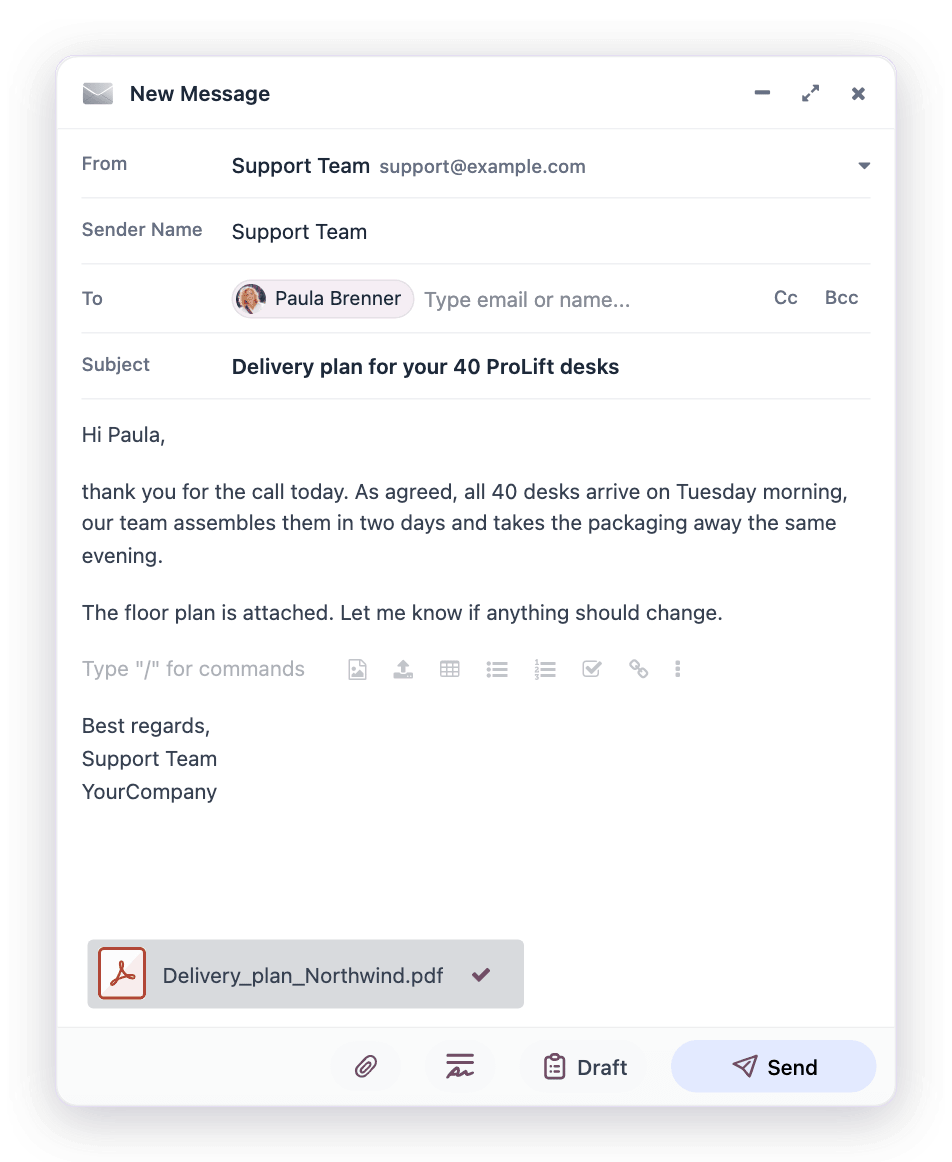
The composer opens next to your inbox. Pick recipients from your Odoo contacts, choose the mailbox you send from, and the right signature is already there.

✓  Rich text, tables, lists, links and attachments

✓  Cc and Bcc, drafts saved as you type, Ctrl+Enter to send

✓  One signature per mailbox, swapped when you switch mailbox

✓  Many recipients? Each gets an individual mail, queued in the background

✓  Large files go out as download links

Writing a new email with a recipient from Odoo and an attachment
04FIND & ORGANISE

Find any mail in seconds, keep the rest in order

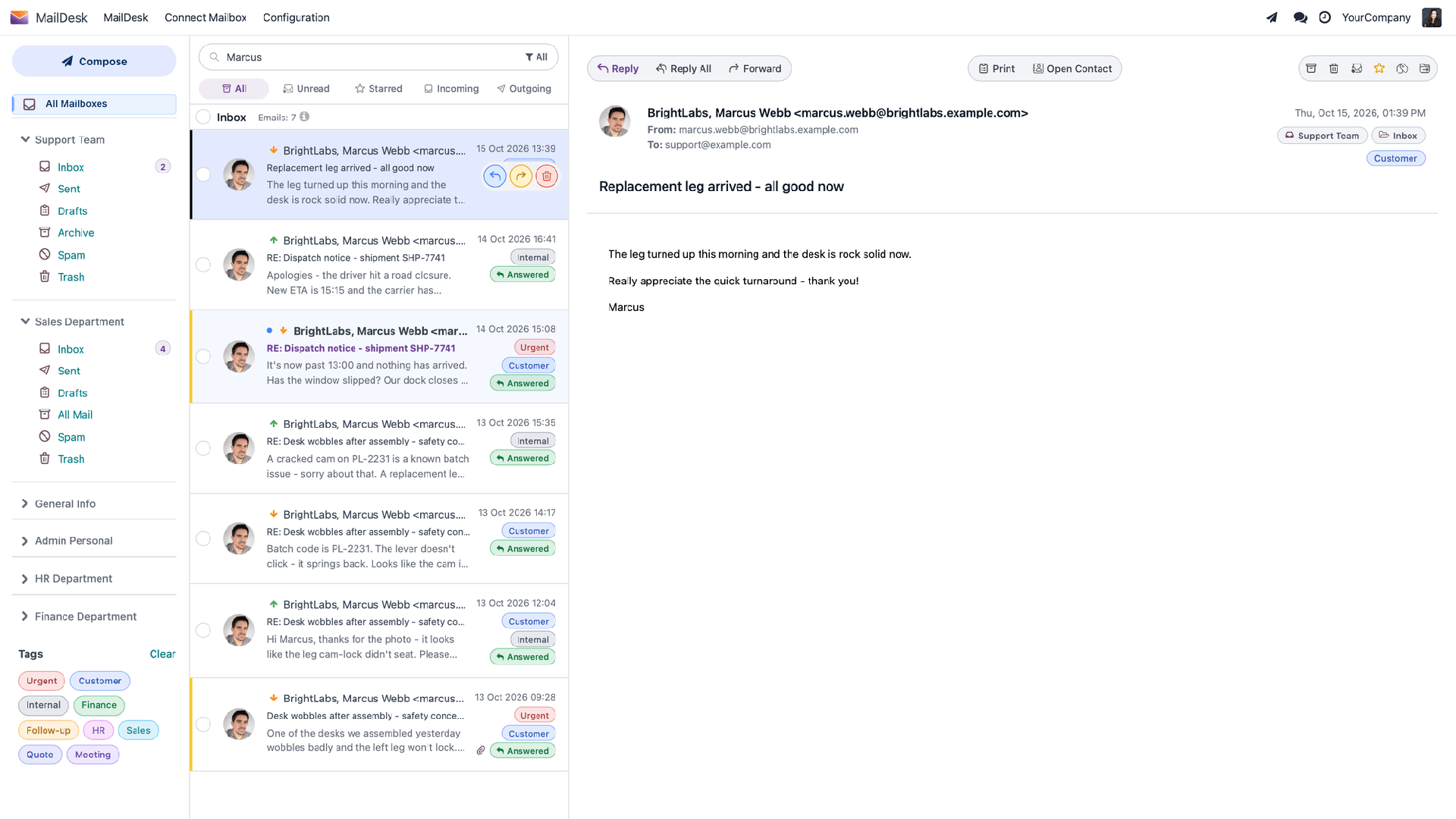
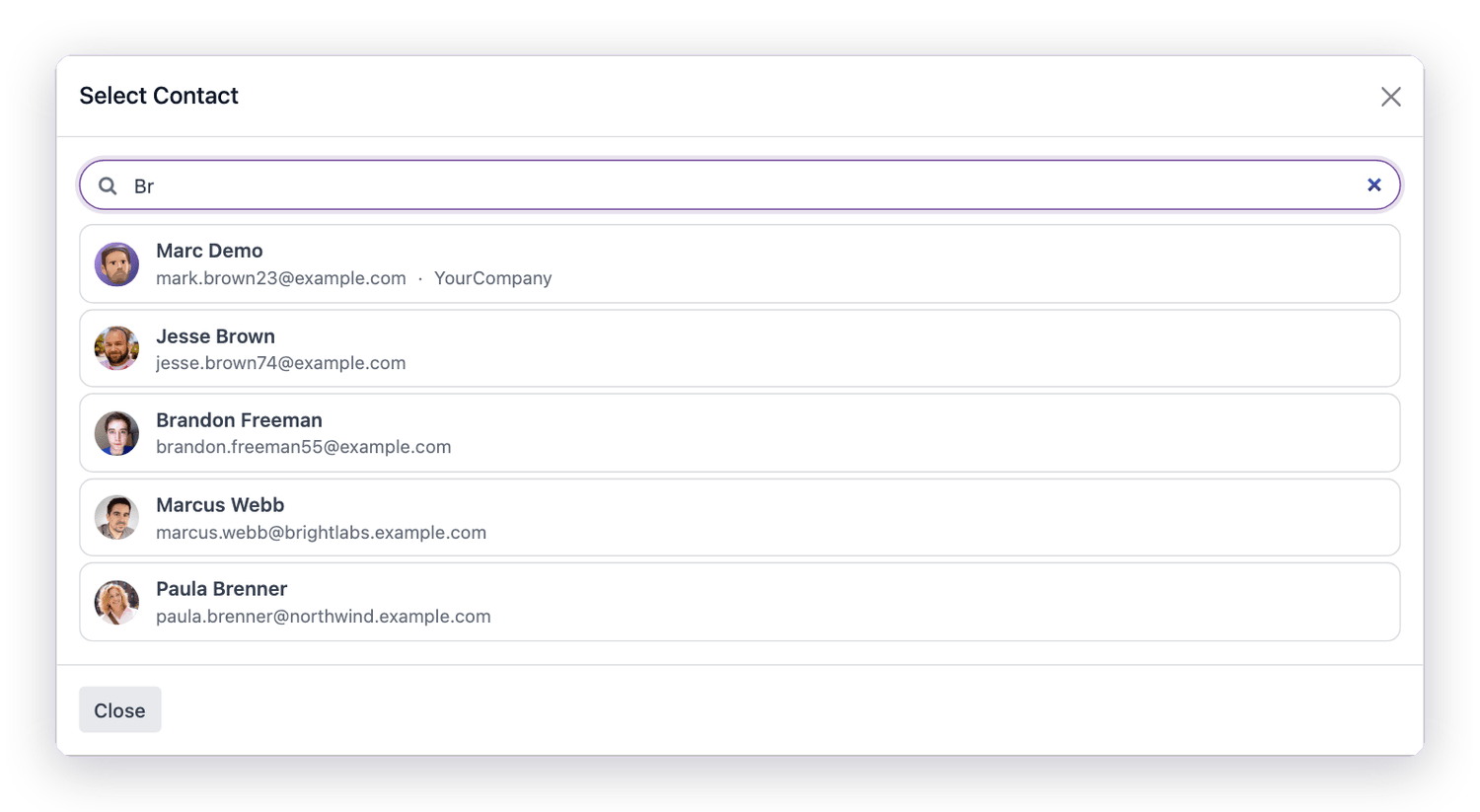
Search by the sender’s name, filter by a contact or a whole company, and file mail with tags and folders.

Searching for a sender by name
Filter by contact or company

Filter by contact

Find a person by name, email, company or tag and see only their mail.

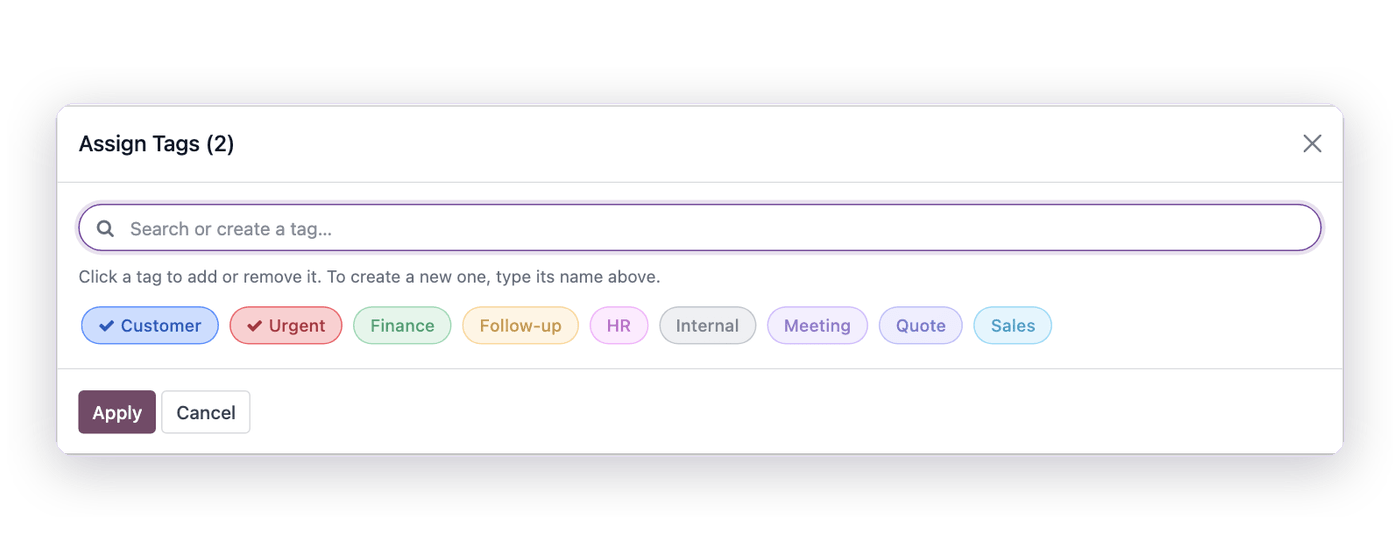
Assign coloured tags

Colour tags

Tag mail as Urgent, Customer or anything you need, and filter the inbox by tag.

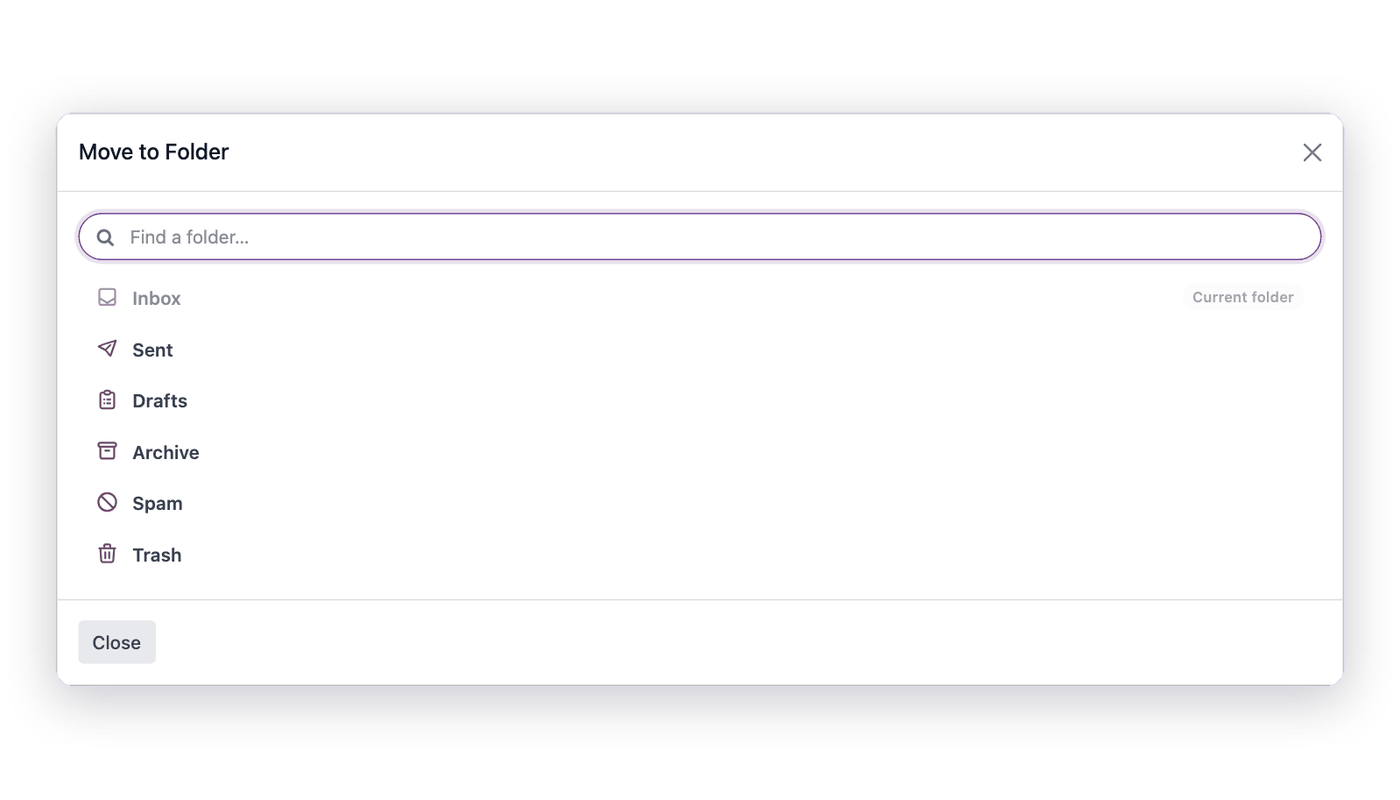
Move a mail to a folder

Folders, drag and drop, undo

Move mail by folder name or drag it onto a folder. A deleted mail can be brought back with Undo.

05CONVERSATIONS

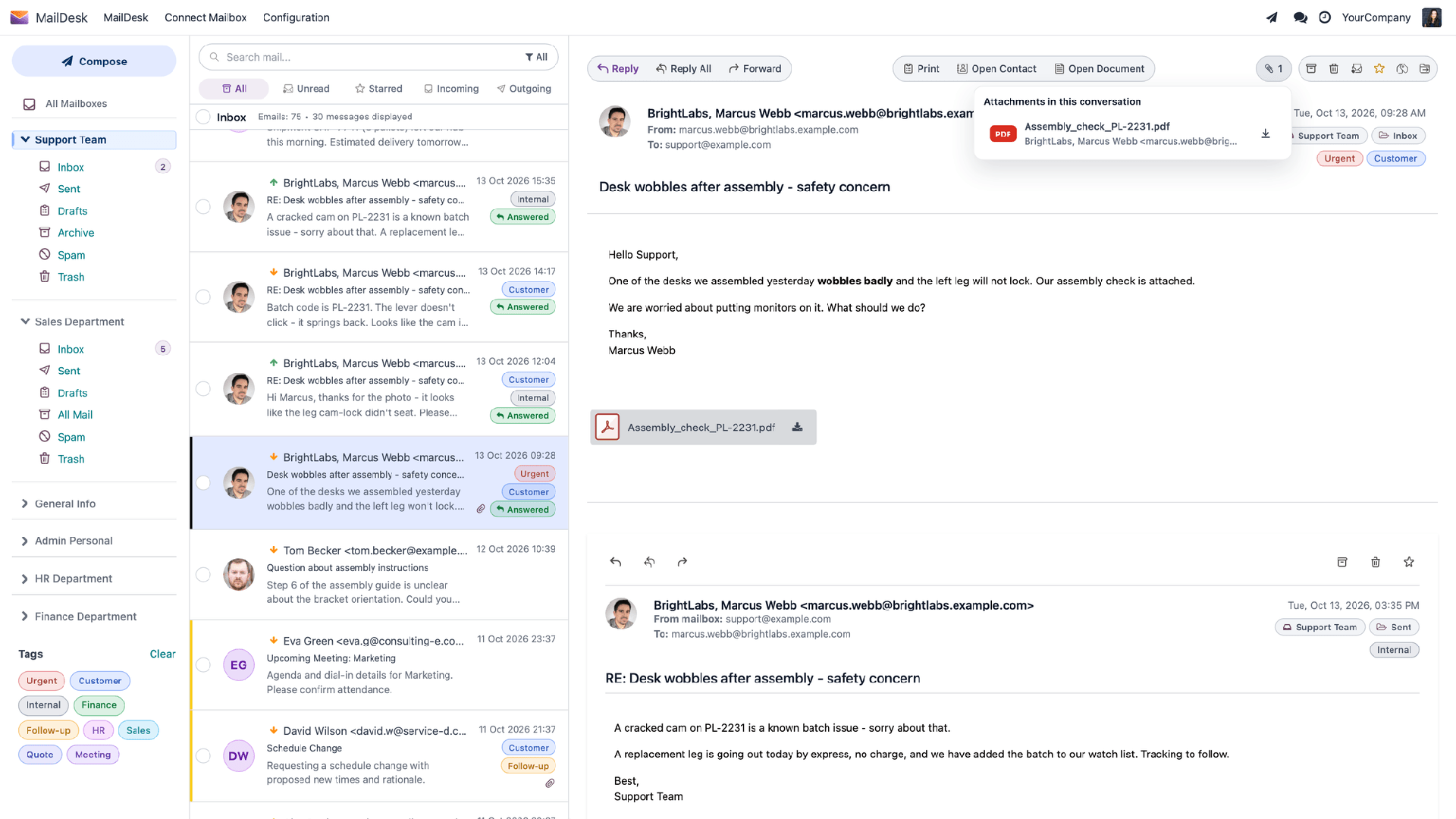
The whole conversation, every file once

Replies join their conversation, so you read a case from the first mail to the last. The paperclip lists every file sent in the conversation, each one once, ready to open or download.

✓  Pictures in a signature are not counted as attachments

✓  Print any mail in one click

All files of a conversation in one list
06SAFE MODE

Unknown senders can’t surprise you

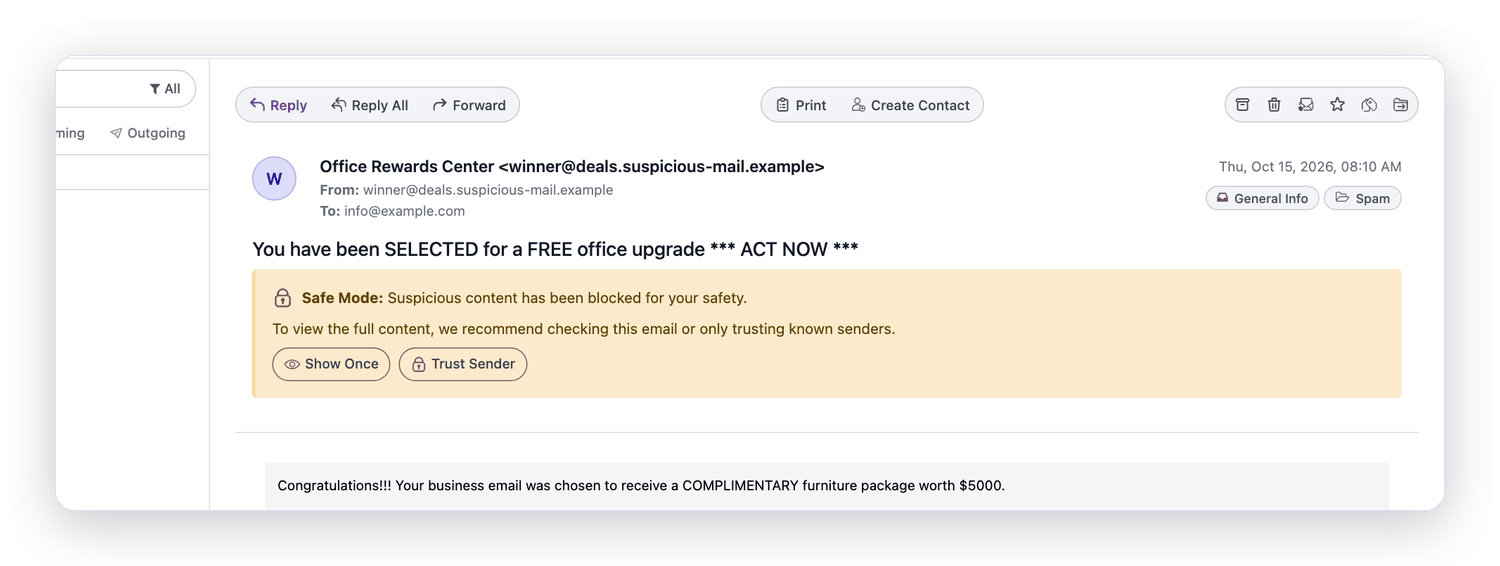
Mail from a sender you don’t trust opens in Safe Mode: remote pictures and active content stay blocked. Show it once, or trust the sender for good.

✓  Tracking pixels can be stripped per mailbox

A suspicious mail opened in Safe Mode
07TEAM MAILBOXES

Shared mailboxes with clear access

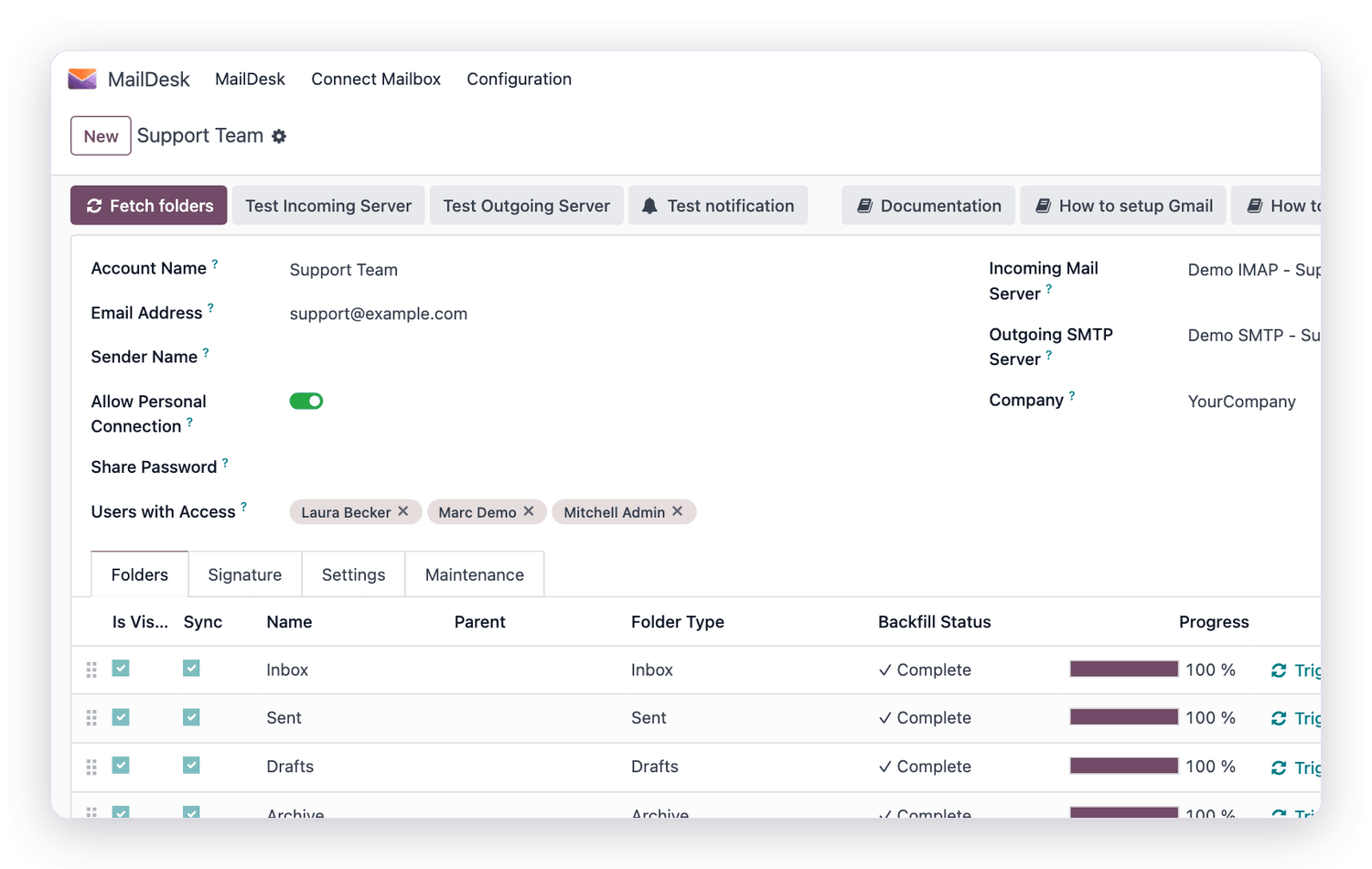
Connect a mailbox once and choose who works in it. Only those users see it, and MailDesk records which colleague sent each mail from a shared mailbox.

✓  Mailbox User and Mailbox Admin roles

✓  Every user sets their own default mailbox

✓  Test buttons for incoming and outgoing mail, and a sync health check

A shared mailbox with its users and folders
08TABLET

At your desk and on your tablet

On a tablet MailDesk shows the list and the open mail side by side, with your folders in a drawer, sized for touch.

✓  A phone layout made for thumbs comes with MailDesk Pro

MailDesk on a tablet
09EVERYTHING IN BASIC

All features at a glance

What MailDesk Basic does, in one place.

Mailboxes & sync icon

Mailboxes & sync

Gmail & WorkspaceMicrosoft 365Shared Outlook mailboxesAny IMAP / SMTPOAuth2 sign-inHistory importSync health
Inbox & reading icon

Inbox & reading

Unified inboxLive unread countsConversationsAnswered marksWide table listSender photosPrintShortcutsNotifications
Find & organise icon

Find & organise

Search by senderQuick filtersFilter by contactColour tagsDrag to folderUndo delete
Write icon

Write

Rich textAttachmentsCc & BccAuto-saved draftsOdoo contactsDefault mailboxSignature per mailboxIndividual bulk sendLarge-file linksCompose from any form
Team & admin icon

Team & admin

Shared mailboxesUser & Admin rolesSent-by trackingMulti-companyReply-to rulesFirst-run guide
Security & more icon

Security & more

Safe ModeTracking-pixel blockerData stays in OdooDesktop & tabletOdoo 17–2011 languages
10SET UP

Running in three steps

No server to install, no extra login for your team.

1
Install MailDesk

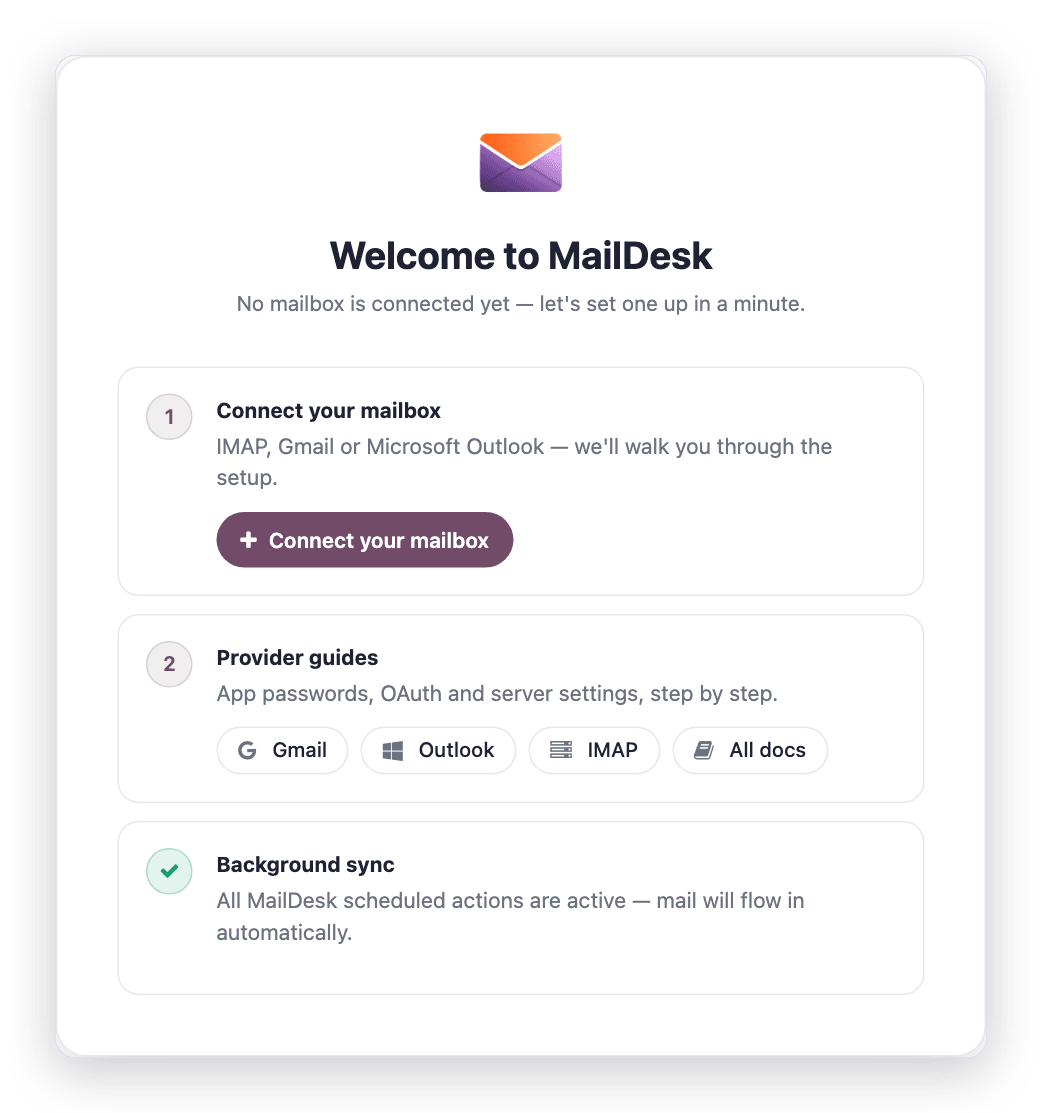
From the Odoo Apps menu, like any other app. A first-start screen guides you.

2
Connect a mailbox

Gmail and Microsoft 365 sign in through OAuth2; any other provider through IMAP and SMTP. Step-by-step guides for Gmail, Outlook and IMAP are built in.

3
Share it with your team

Add the users who work in the mailbox. MailDesk fetches the history in the background while you already work.

MailDesk first-run screen with the provider guides

New mail arrives on a schedule: Gmail every 2 minutes, IMAP and Microsoft 365 every 3 minutes. Push comes with MailDesk Pro.

Basic, Pro or Business?

Each edition contains everything in the one before. The difference at a glance:

 BasicProBusiness
Mailboxes and usersunlimitedunlimitedunlimited
Receive and write email, conversations, filters, tags✓✓✓
Changes in both directions: read, moved, deleted—✓✓
AI: phishing check, summaries, reply drafts—✓✓
AI providers: OpenAI, Gemini, Claude, Mistral, Grok, DeepSeek or your own server—✓✓
Signatures, personal and shared—✓✓
Phone layout and dark mode—✓✓
Twelve Odoo integrations: Calendar, Chatter, CRM, Documents, Helpdesk, Inventory, Invoicing, Partner 360, Project, Purchase, Sales, Time Off——✓
Automation: rules, AI steps, rules in plain words——✓
Email support, Monday to Friday (CET)—answer within 2 daysanswer within 1 day
Phone support in German and English——✓
MailDesk ProMAILDESK PRO

When your mailbox should do more

Pro installs on top of Basic and keeps everything you set up.

✓  Two-way sync: read, star, move and delete reach the mail server

✓  Push for Gmail and Microsoft 365, IMAP IDLE

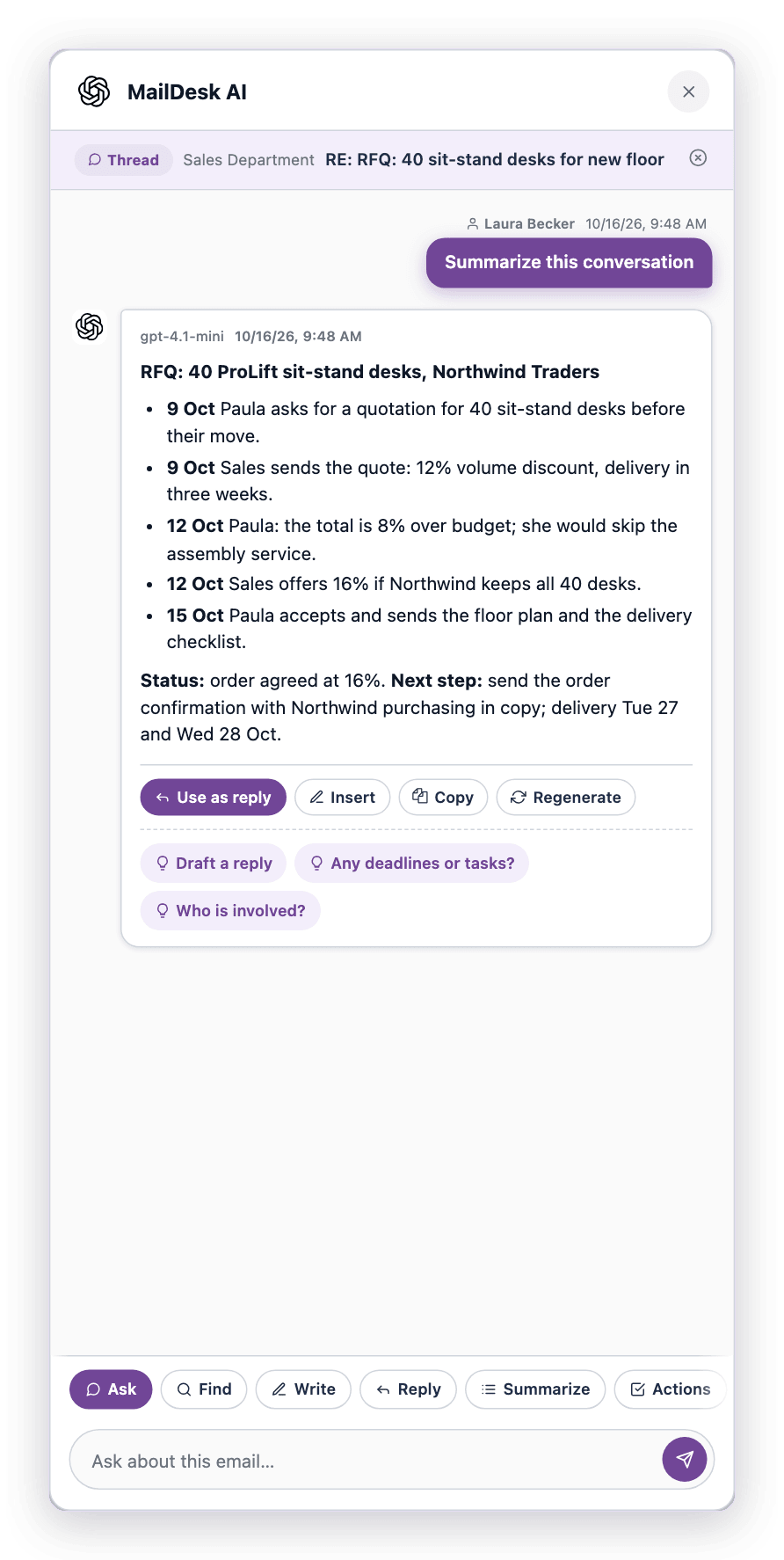
✓  MailDesk AI: briefs, summaries, reply drafts, search by meaning

✓  Link one mail to every record it concerns

✓  Several signatures per mailbox, email templates, receipt requests

✓  Phone layout, dark mode, unread overview in the top bar

MailDesk AI summarising a customer conversation
11THE MAILDESK SUITE

Add-on modules for the Odoo apps you use

Each add-on is a separate module that connects MailDesk with one Odoo app. They are sold in our shop; their AI features need MailDesk Pro.

MailDesk CRM
MailDesk CRM

Link mail to leads and opportunities; with Pro, the AI qualifies a lead from a mail.

View in the shop →
MailDesk Sales
MailDesk Sales

Link quotations and orders; with Pro, the AI drafts a quotation from a sales mail.

View in the shop →
MailDesk Helpdesk
MailDesk Helpdesk

Link mail to tickets and open a ticket from a mail (Helpdesk is an Odoo Enterprise app).

View in the shop →
MailDesk Project
MailDesk Project

Link mail to projects and tasks.

Included in MailDesk Business
MailDesk Calendar
MailDesk Calendar

Link meetings and invitations to the mail they came with.

View in the shop →
MailDesk Documents
MailDesk Documents

Attach files from Documents and file attachments into it (an Odoo Enterprise app).

View in the shop →
MailDesk Invoicing
MailDesk Invoicing

Link mail to customer invoices and vendor bills.

Included in MailDesk Business
MailDesk Purchase
MailDesk Purchase

Link requests for quotation and purchase orders.

Included in MailDesk Business
MailDesk Inventory
MailDesk Inventory

Link mail to transfers and deliveries.

Included in MailDesk Business
MailDesk Time Off
MailDesk Time Off

Create and link time-off requests from a mail.

Included in MailDesk Business
MailDesk Chatter
MailDesk Chatter

Discuss a mail with colleagues; with Pro, an AI brief turns it into a note or an activity.

View in the shop →
MailDesk Partner 360

A customer panel with everything about the contact, next to the mail.

View in the shop →
MailDesk Automation
MailDesk Automation

Rules per mailbox with an audit log; with Pro, describe a rule and the AI builds it.

View in the shop →
MailDesk Business — every add-on is also sold on its own; MailDesk Business bundles Pro, all twelve add-ons and the Automation Engine in one licence.
View MailDesk Business

In your language

MailDesk speaks English and ships translations for:

DeutschEspañolFrançaisItalianoNederlandsPolskiPortuguêsРусскийTürkçe中文
12YOUR LICENCE

A monthly subscription

Every current and future Odoo version is covered: 17, 18, 19, 20 and the ones that follow.

✓  Minimum term twelve months, then cancellable monthly

✓  One licence per productive Odoo instance, for your whole team: no fees per user

✓  Metzler IT Software Licence (MOPL-1.0): you receive a right of use, the software remains the property of Metzler IT

✓  Not included: Odoo itself, your email provider

All editions and terms side by side: mit-odoo.de/pricing

Questions, answered

Does MailDesk replace our mail server?

No. MailDesk is a mail client inside Odoo. Your mailboxes stay with Gmail, Microsoft 365 or your IMAP provider.

What is the difference to Odoo’s chatter?

The chatter shows the messages of one record. MailDesk shows your whole mailbox with folders, conversations and shared team mailboxes, next to your Odoo contacts.

Does Basic move or delete mail on my mail server?

No. In Basic, moving, archiving and deleting organise the mail inside MailDesk; a deleted mail goes to MailDesk’s Trash. Your mail server keeps its copy. MailDesk Pro carries these changes to the server.

Do we still need Outlook or Gmail?

No, your team can work fully in Odoo. You can also keep using Outlook or Gmail next to it; with Pro, reading, moving and deleting stay in step on both sides.

Do I need Odoo Enterprise?

No. MailDesk Basic works on Odoo Community and Enterprise, versions 17, 18, 19 and 20. It is licensed per Odoo instance, not per user.

Does it run on Odoo Online, Odoo.sh or our own server?

On your own server and on Odoo.sh. Odoo Online does not allow third-party modules, so MailDesk cannot run there.

Is my mail sent through Metzler IT?

No. Your Odoo connects to Gmail, Microsoft 365 or your IMAP server itself. Mail and attachments are stored in your Odoo.

Is my existing mail imported?

Yes. After you connect a mailbox, MailDesk fetches its history in the background, folder by folder, while you already work.

How fast does new mail appear?

Basic checks Gmail every 2 minutes and IMAP and Microsoft 365 every 3 minutes; the list updates by itself when it arrives. Pro adds push for Gmail and Microsoft 365 and IMAP IDLE.

Can I use it on my phone?

Basic is made for desktop and tablet. The phone layout, with a mail-app header, rows and compose screen, is part of MailDesk Pro.

Can I upgrade to Pro later?

Yes. Pro installs on top of Basic; your mailboxes, mail and settings stay as they are. MailDesk Pro is here in our shop.

Can I see it before I buy?

Yes. Ask us for a demo, or watch MailDesk in action on our YouTube channel.

Bring your mail into Odoo today

Questions before you buy? Write to us, we answer personally.

Metzler IT GmbH · Solution Partner in the BOP Alliance

Specifications

Version 17.0, 18.0, 19.0, 20.0