Skip to Content
MailDesk Pro - Monthly subscription
  • No SaaS · runs inside your own Odoo
  • Your mail & data stay in your database
  • Works with Odoo 17 · 18 · 19 · 20 - your choice
  • Continuously updated — 16 modules, 12 workflow bridges
Subscriptions

MailDesk Pro - Monthly subscription

50+ countries
MD-PRO-MON

MailDesk Pro includes everything in Basic, plus two-way email synchronisation, AI summaries and reply drafts with the provider you choose (using your own keys), signatures and a mobile-friendly interface.

Connect your existing email accounts and work directly in Odoo. The 12 Odoo workflow integrations and the Automation Engine are included in Business.

Monthly: 59.00 €
  • Version
Prices excl. VAT · choose your Odoo version below
Invalid email
MAILDESK PRO · ODOO 17 · 18 · 19 · 20

Two-way sync, push and an AI assistant for your Odoo inbox

Everything in MailDesk Basic, plus: what you do in Odoo reaches the mail server, new mail arrives by push, and MailDesk AI briefs, summarises and drafts replies with the AI provider you choose.

Includes MailDesk BasicGmail, Microsoft 365, IMAPYour own AI providerOdoo Community & Enterprise
▶  Watch MailDesk in action
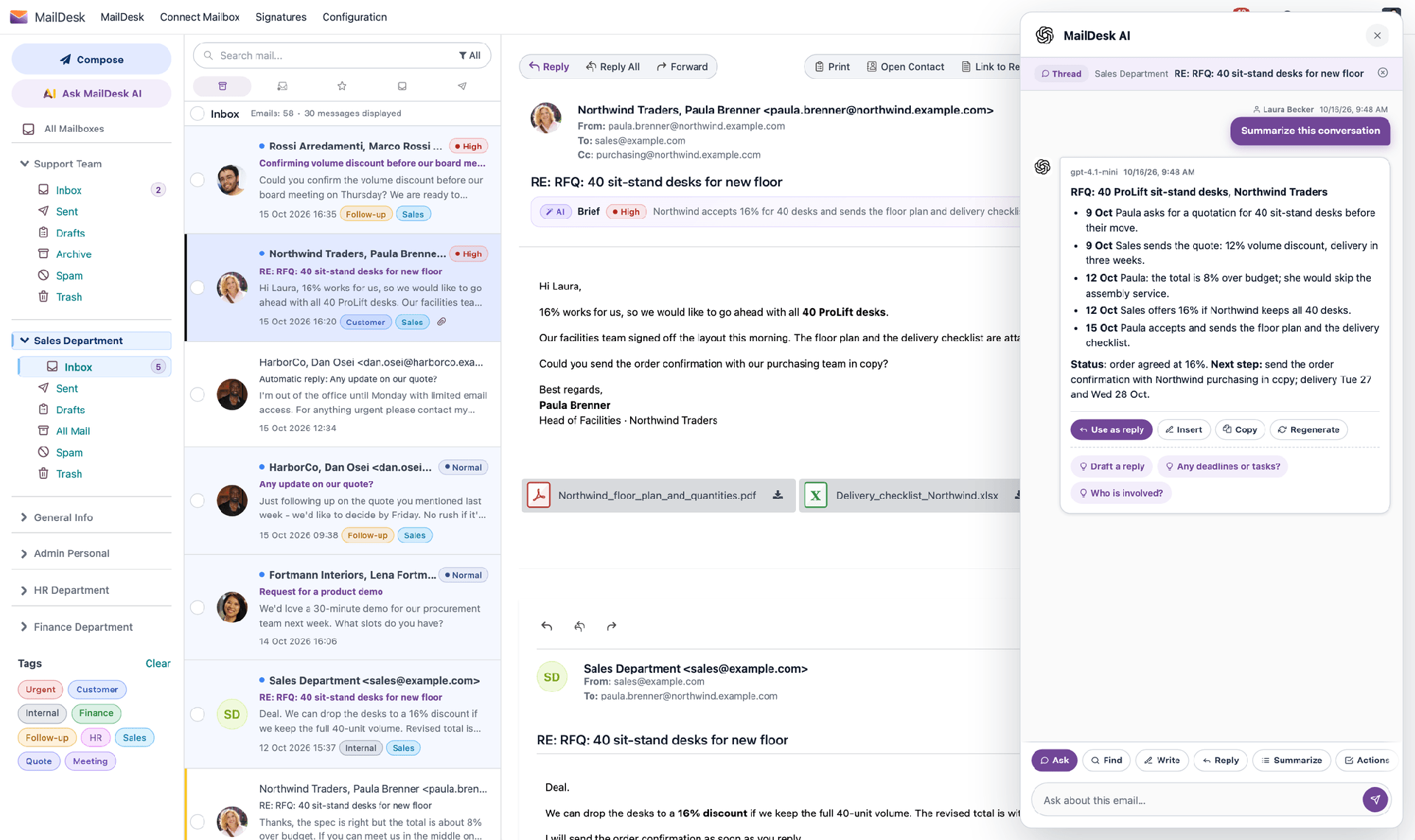
MailDesk AI summarising a customer conversation next to the inbox
BOP AllianceBuilt by Metzler IT, Solution Partner in the Integrations category of the BOP Alliance (Best Odoo Partners).

What Pro adds to MailDesk Basic

Pro installs on top of Basic. Your mailboxes, mail and settings stay as they are.

Two-way sync icon

Two-way sync

Read, star, move or delete in Odoo, and the mailbox on Gmail, Microsoft 365 or your IMAP server follows.

New mail by push icon

New mail by push

Push for Gmail and Microsoft 365, IMAP IDLE for mailboxes in use, and a quick check of the inbox you have open.

MailDesk AI icon

MailDesk AI

Briefs on new mail, conversation summaries, reply drafts and search by meaning, with your own AI provider.

Link to any record icon

Link to any record

Connect a mail to a contact or any other record in Odoo, and decide who sees it there.

Signatures & templates icon

Signatures & templates

Several signatures per mailbox, Odoo email templates in the composer, delivery and read receipt requests.
Phone, dark mode, top bar icon

Phone, dark mode, top bar

A phone layout made for thumbs, Odoo’s dark mode, and unread mail per mailbox in Odoo’s top bar.

01AI BRIEFS

Know what a mail wants before you open it

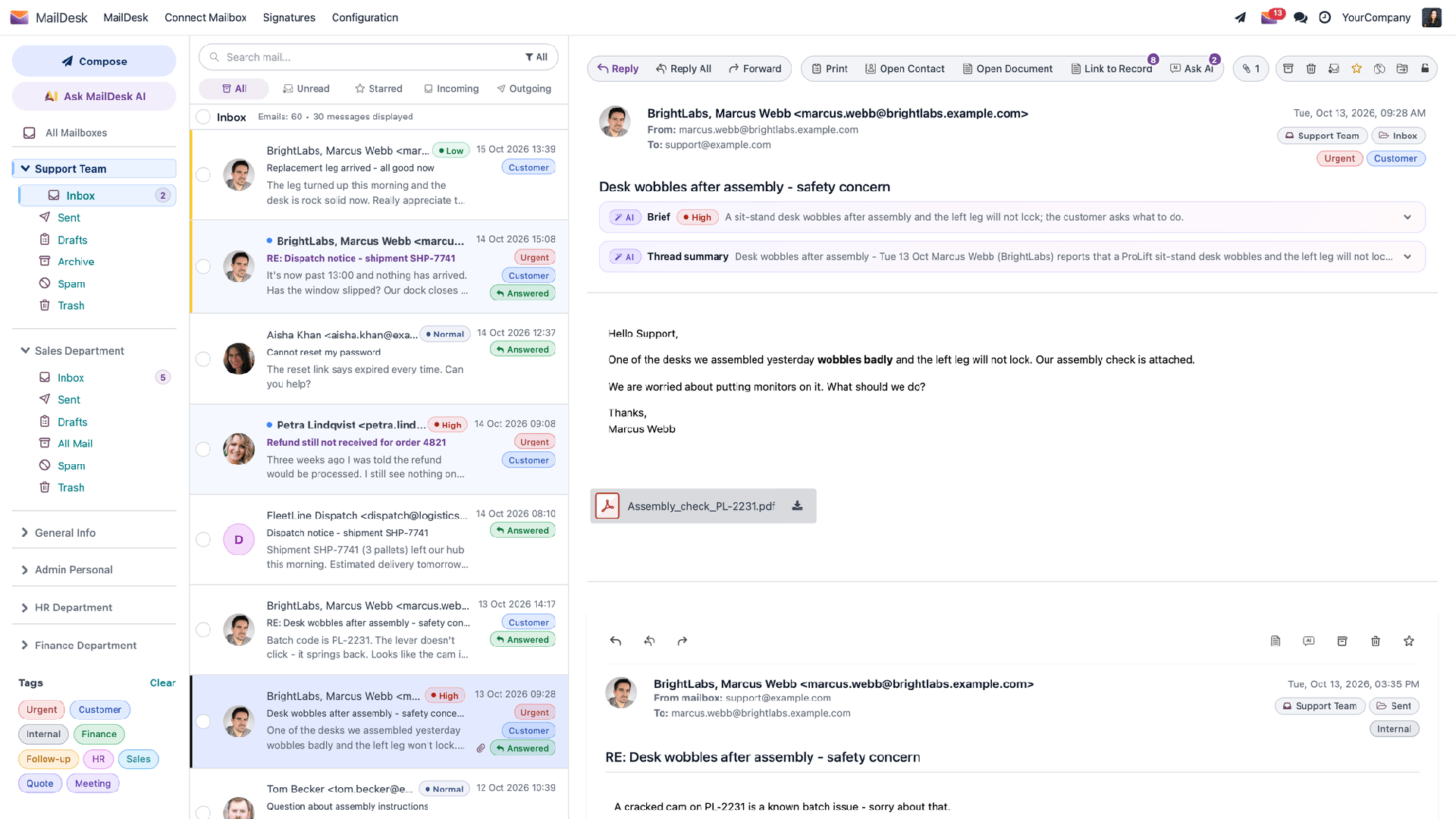
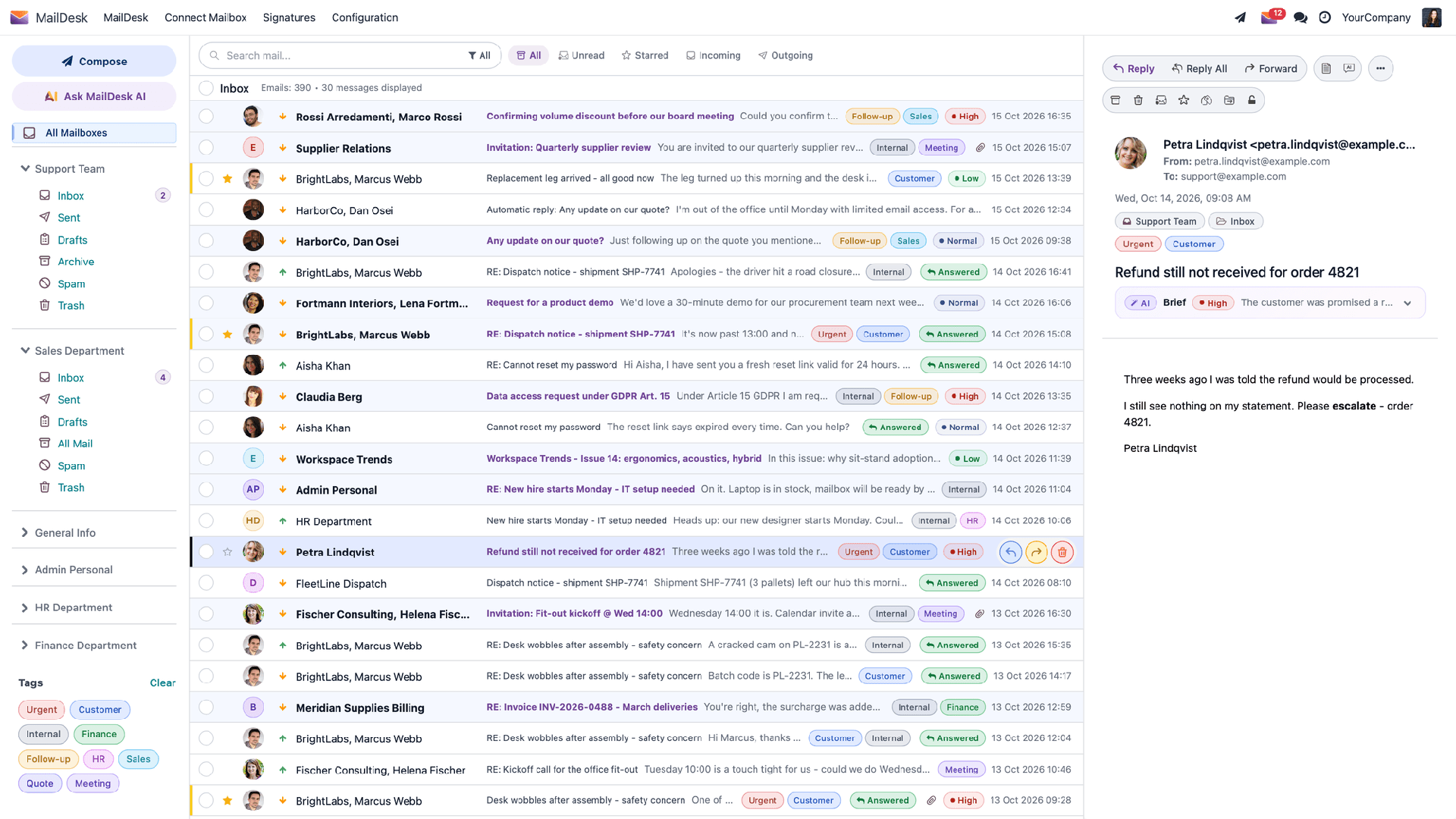
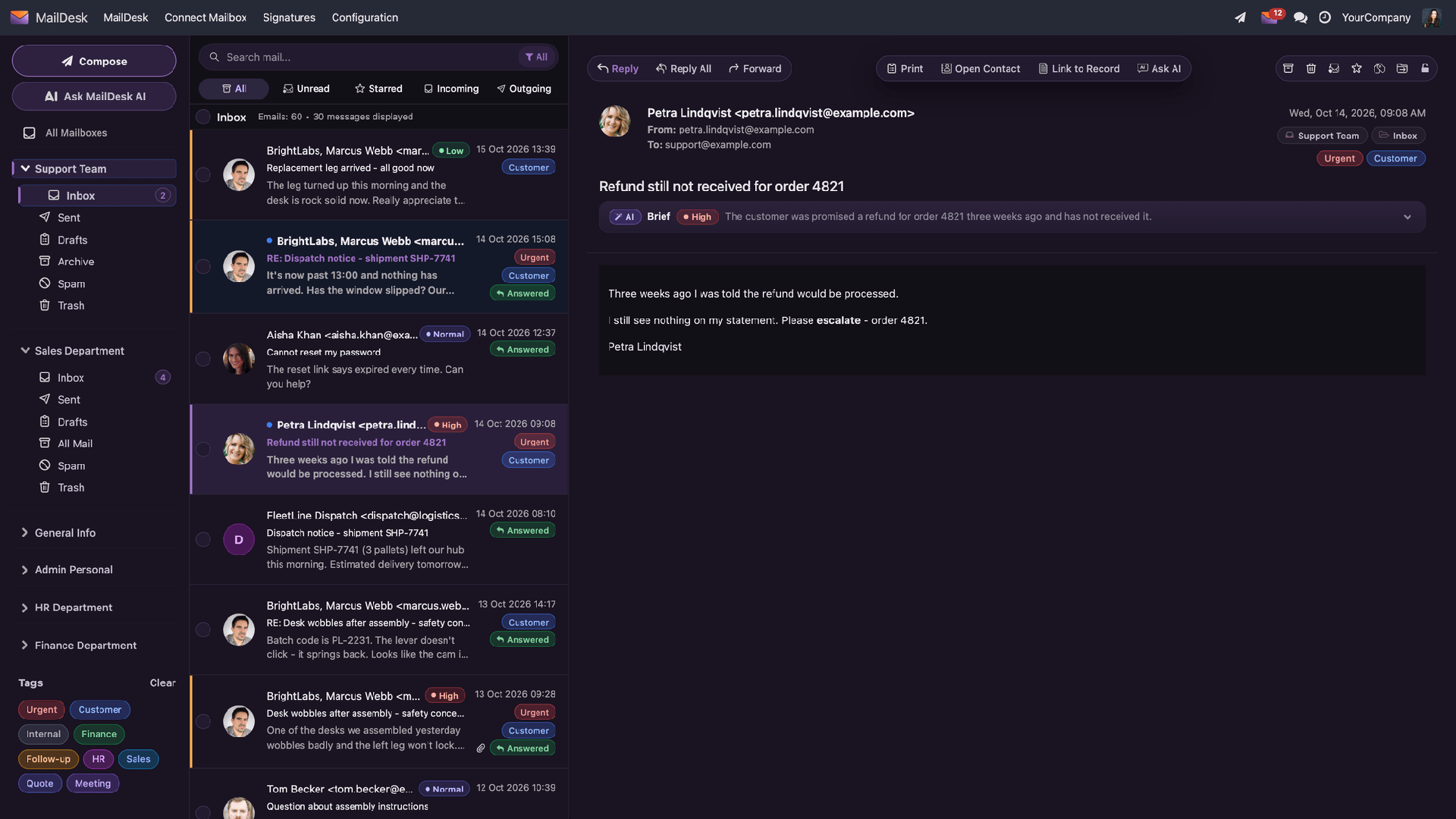
New mail in the Inbox gets a short brief: the priority with its reason, what the sender wants and the next steps. The list shows the priority at a glance; the brief sits on top of the open mail.

✓  High, Normal and Low at a glance✓  A digest of the whole conversation✓  Switch off per mailbox
AI priority in the list and an AI brief on the open mail
02REPLY DRAFTS

Say what to answer, get a ready reply

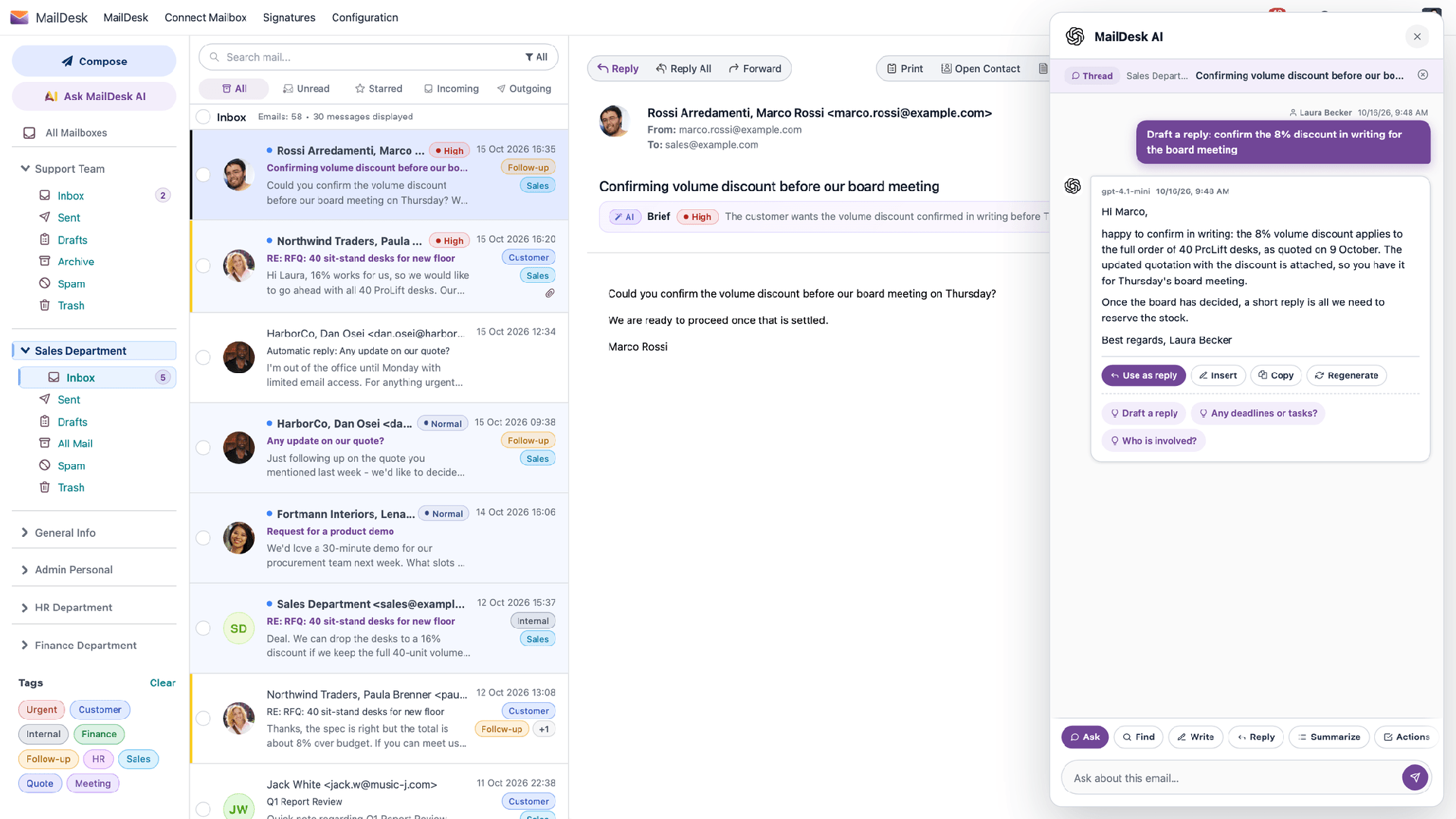
Tell MailDesk AI the key points. It writes the reply from the conversation, in the tone you set for the mailbox.

✓  Use as reply, insert, copy or regenerate

✓  Follow-up questions about the same conversation

✓  Nothing is sent until you press Send

MailDesk AI drafting a reply to a quotation request
03ASK MAILDESK

Ask your inbox

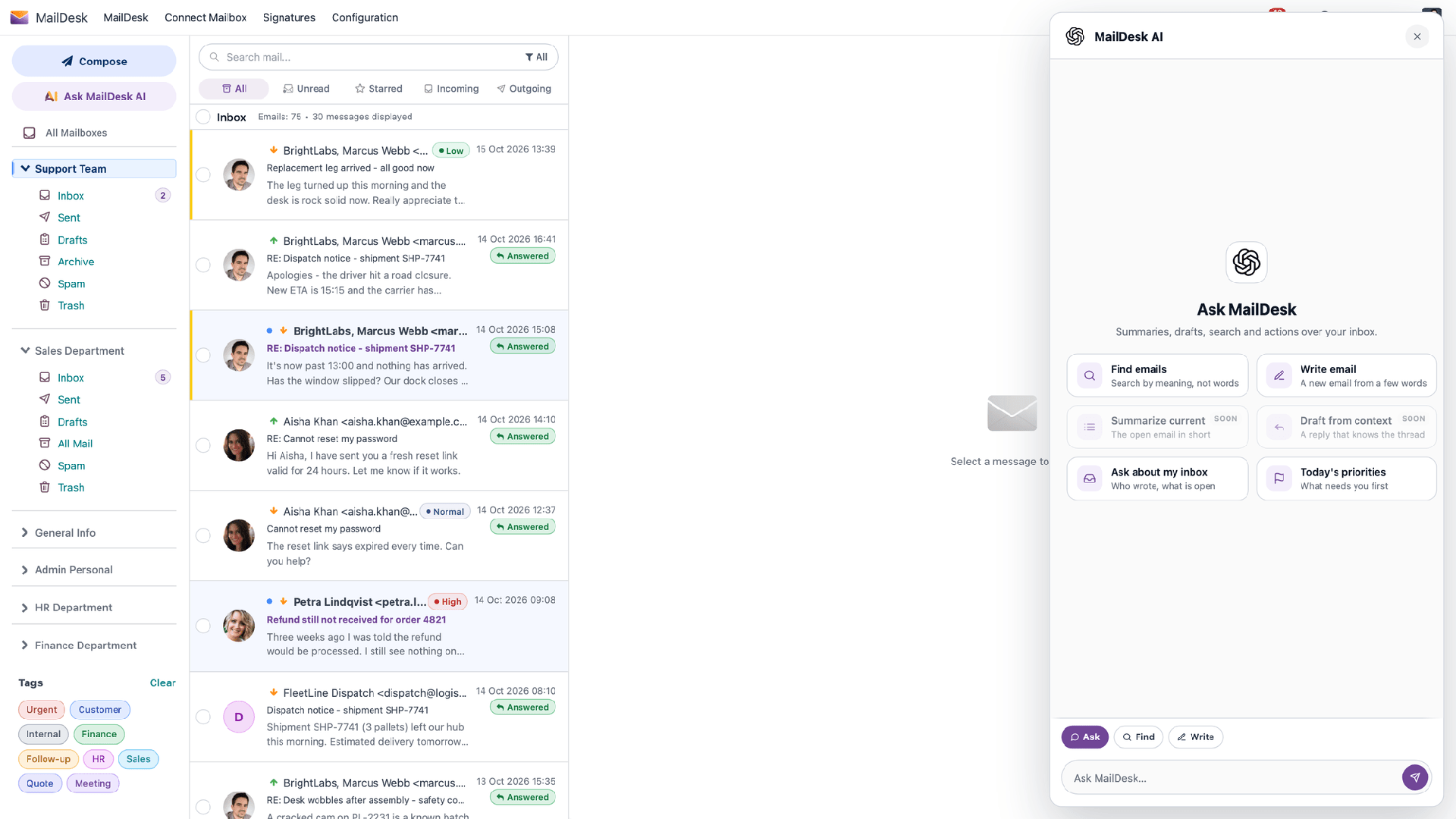
The AI panel works on the open mail or on the whole inbox.

✓  Find emails by meaning, not by exact words

✓  Write a new email from a few words

✓  Summarise the open mail

✓  Who wrote, what is open, what needs you first today

✓  In Safe Mode, check a suspicious mail with AI

The Ask MailDesk panel with its actions
04YOUR AI, YOUR RULES

You choose the provider, each mailbox chooses how much AI

MailDesk AI runs with your own API key. Your Odoo sends the text of the mail you work on straight to the provider you picked; usage is billed by that provider.

OpenAIGoogle GeminiAnthropic ClaudeMistralxAI GrokDeepSeekYour own server: Ollama, LM Studio, vLLM
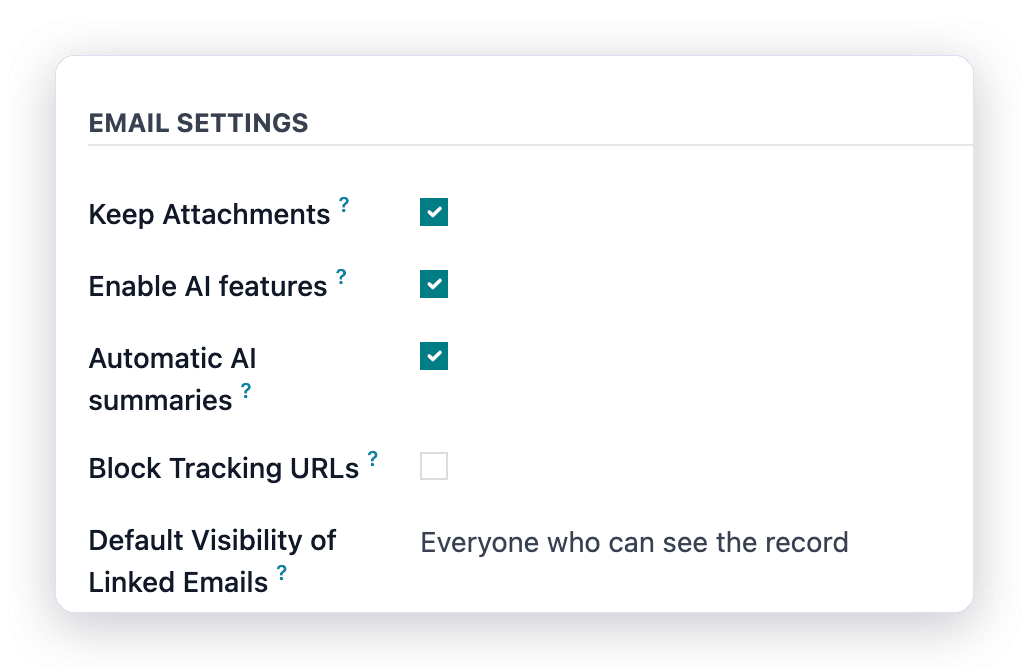
AI switches of a mailbox

On, off or on demand

Turn AI on per mailbox and decide whether new mail is briefed in the background or only when someone asks.

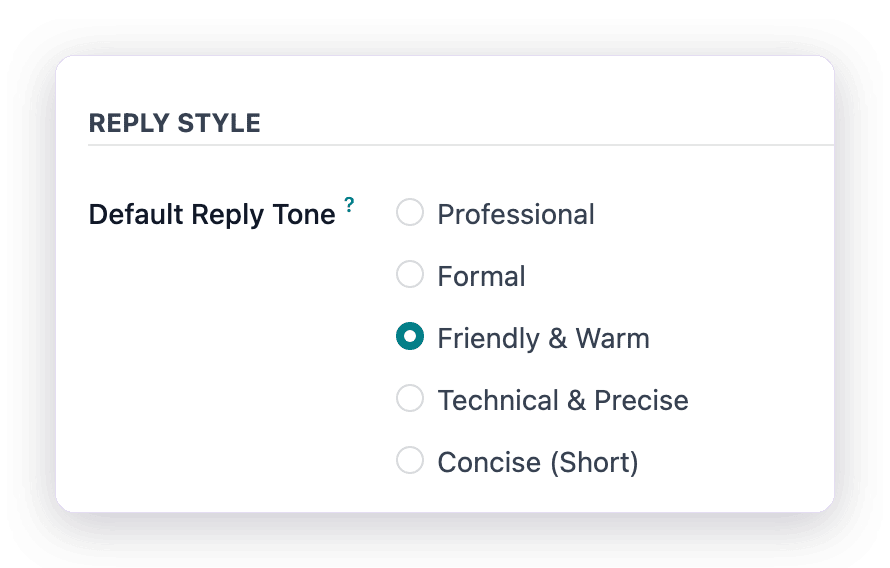
Default reply tone of a mailbox

The tone of every reply

Professional, formal, friendly, technical or short: each mailbox answers in its own voice.

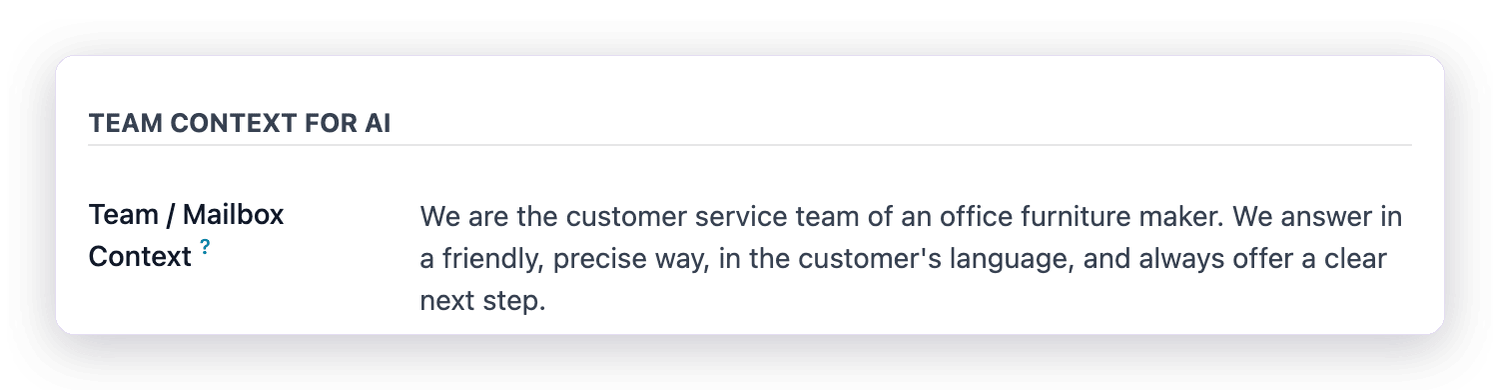
Team context for the AI

Context about your team

A few lines about who you are and how you answer; every summary and draft takes them into account.

Different tasks can use different providers, for example one for summaries and another for reply drafts.

05LINK TO RECORDS

One mail, every record it concerns

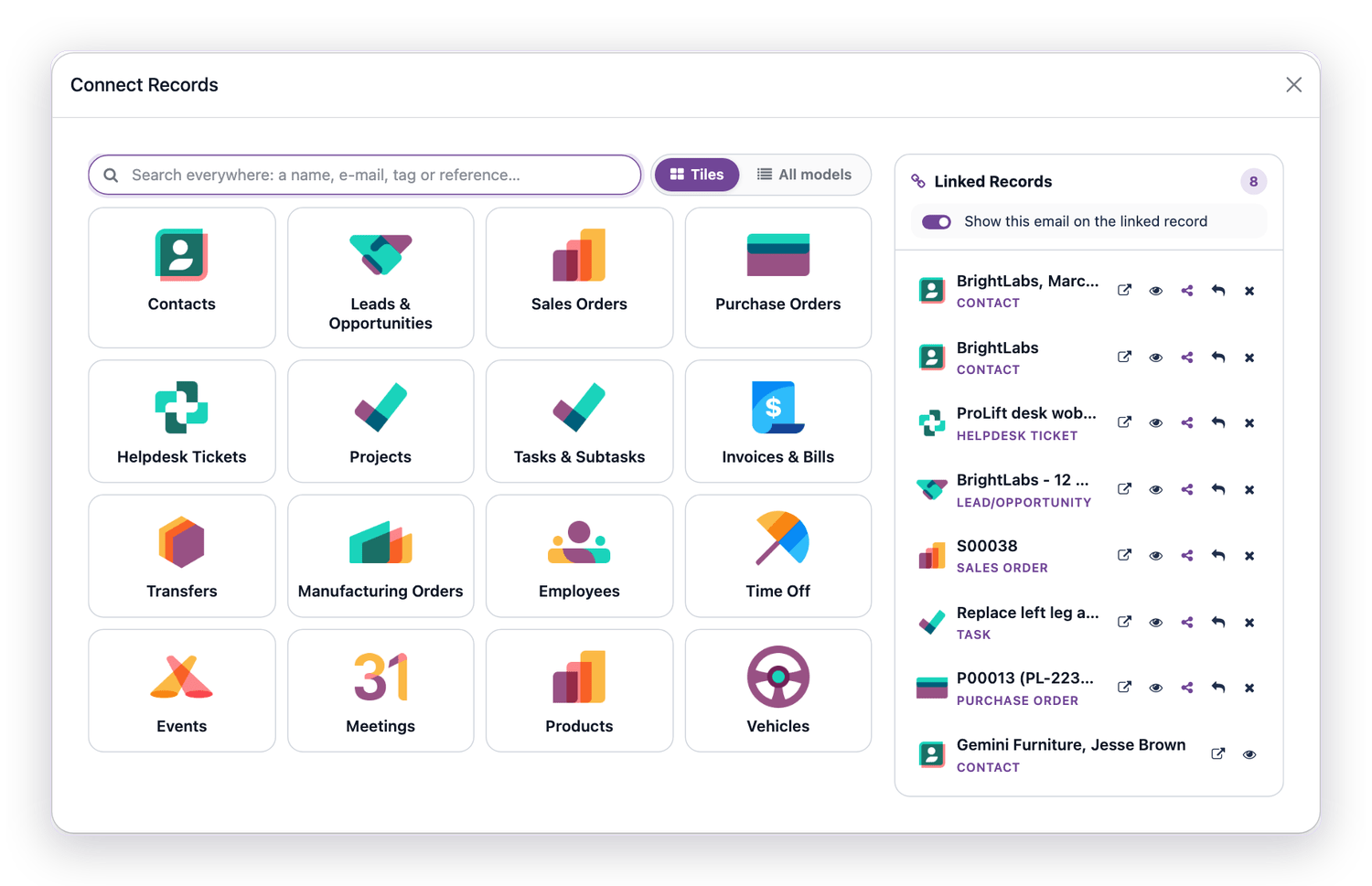
A customer’s complaint touches the contact, the ticket, the order and the task to fix it. Link the mail to all of them at once: pick a tile for any installed Odoo app, or search every record by name, email, tag or reference.

✓  A tile for each installed Odoo app; administrators add tiles for any record with a chatter

✓  The badge on the button counts the records a mail is linked to

✓  Per link: open the record, show the mail there or keep it private

✓  Add-on modules add ready actions for CRM, Sales, Helpdesk, Project and more

One mail linked to eight records, with a tile for every Odoo app
06EVERYTHING IN BASIC, INCLUDED

Your inbox, the way you like it

Pro comes with every feature of MailDesk Basic. Drag the list wider and it becomes a table with resizable columns, AI priority and tags at a glance.

The mail list as a wide table with AI priority
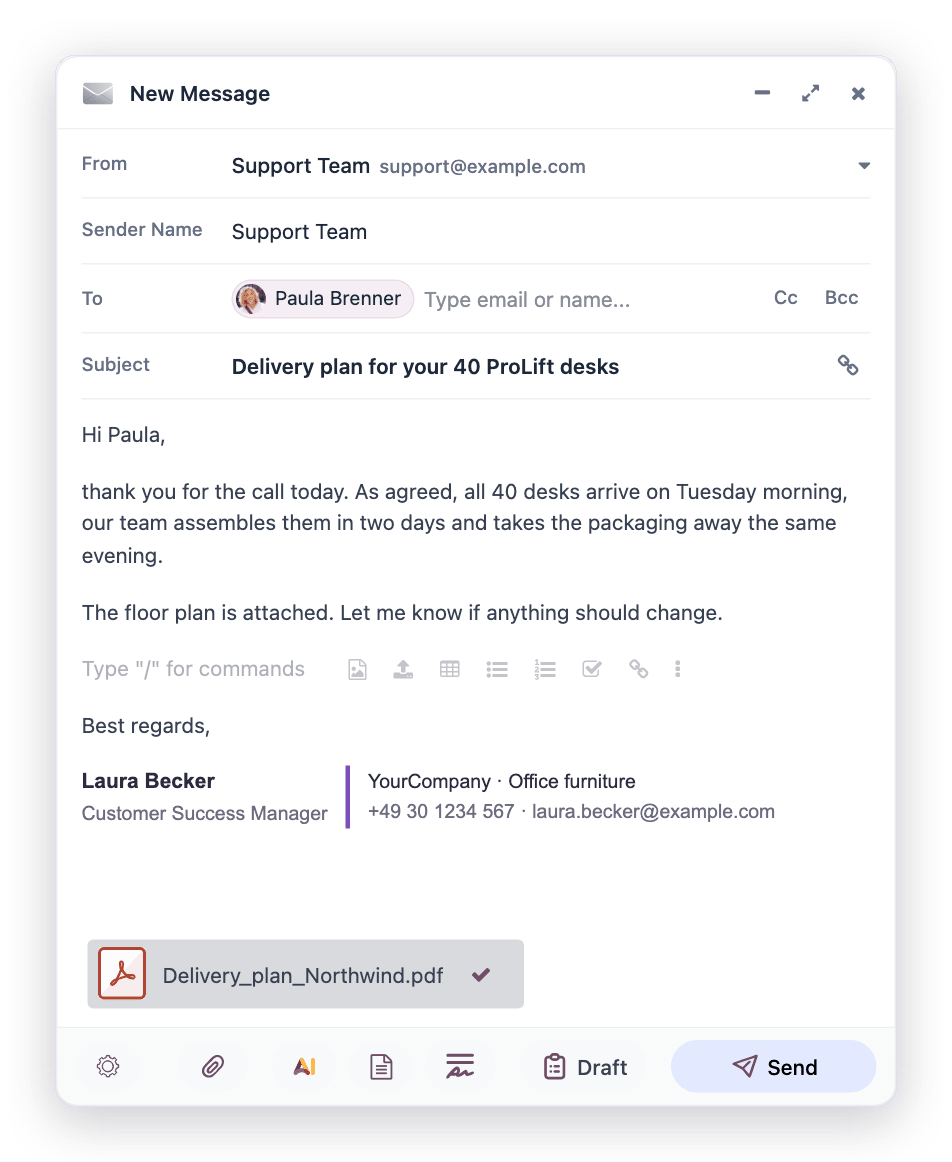
Writing a new email with a recipient from Odoo and an attachment

Write next to your inbox

Recipients from Odoo contacts, the right mailbox and signature, attachments, drafts saved as you type; in Pro with MailDesk AI and your email templates one click away.

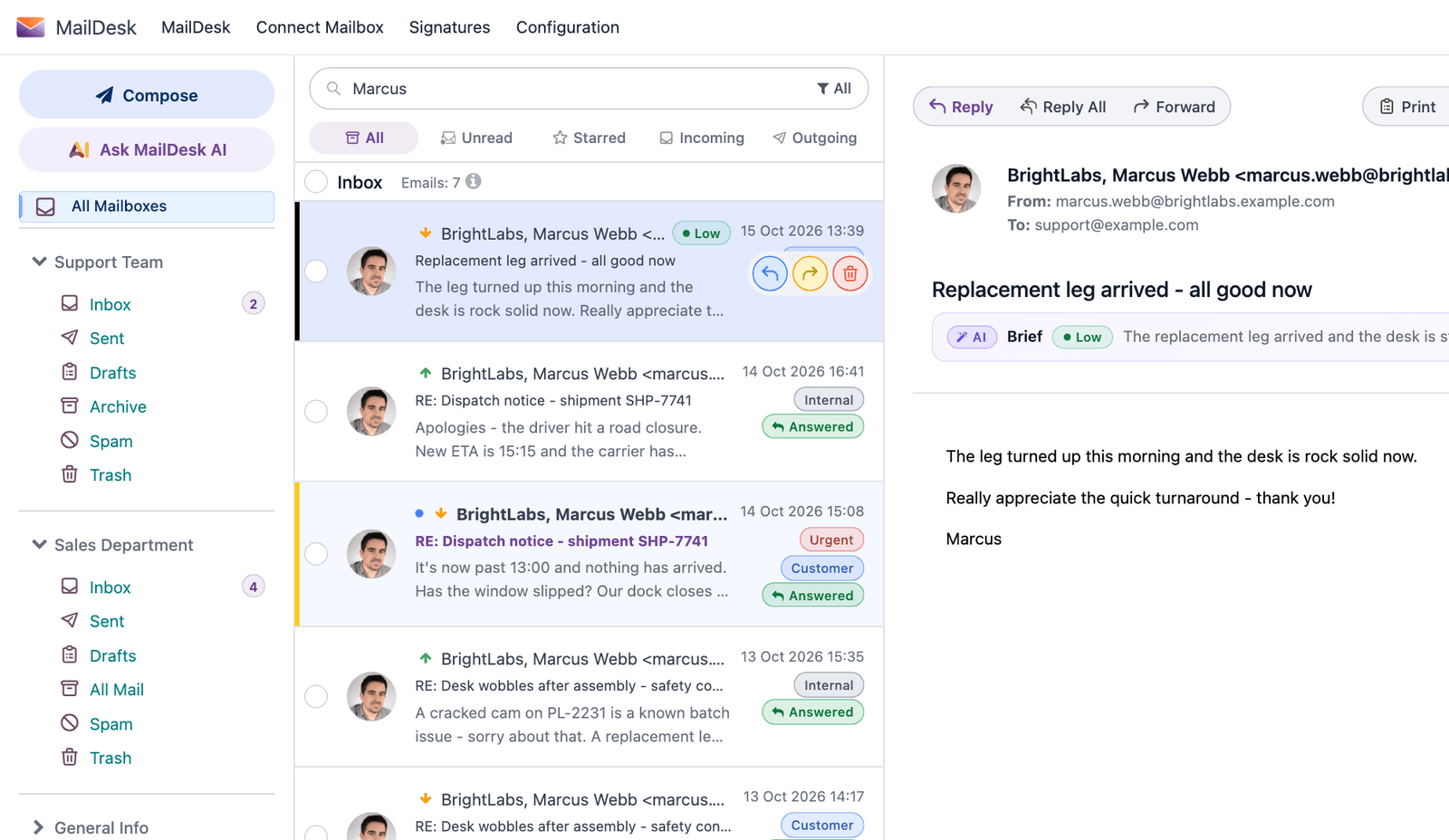
Searching for a sender by name

Find any mail in seconds

Search by the sender’s name, filter by contact, company, tag, Unread or Starred, and read the whole conversation.

07WRITE LIKE A TEAM

Signatures, templates and receipts

The composer knows who is writing, for which mailbox, and what your company usually says.

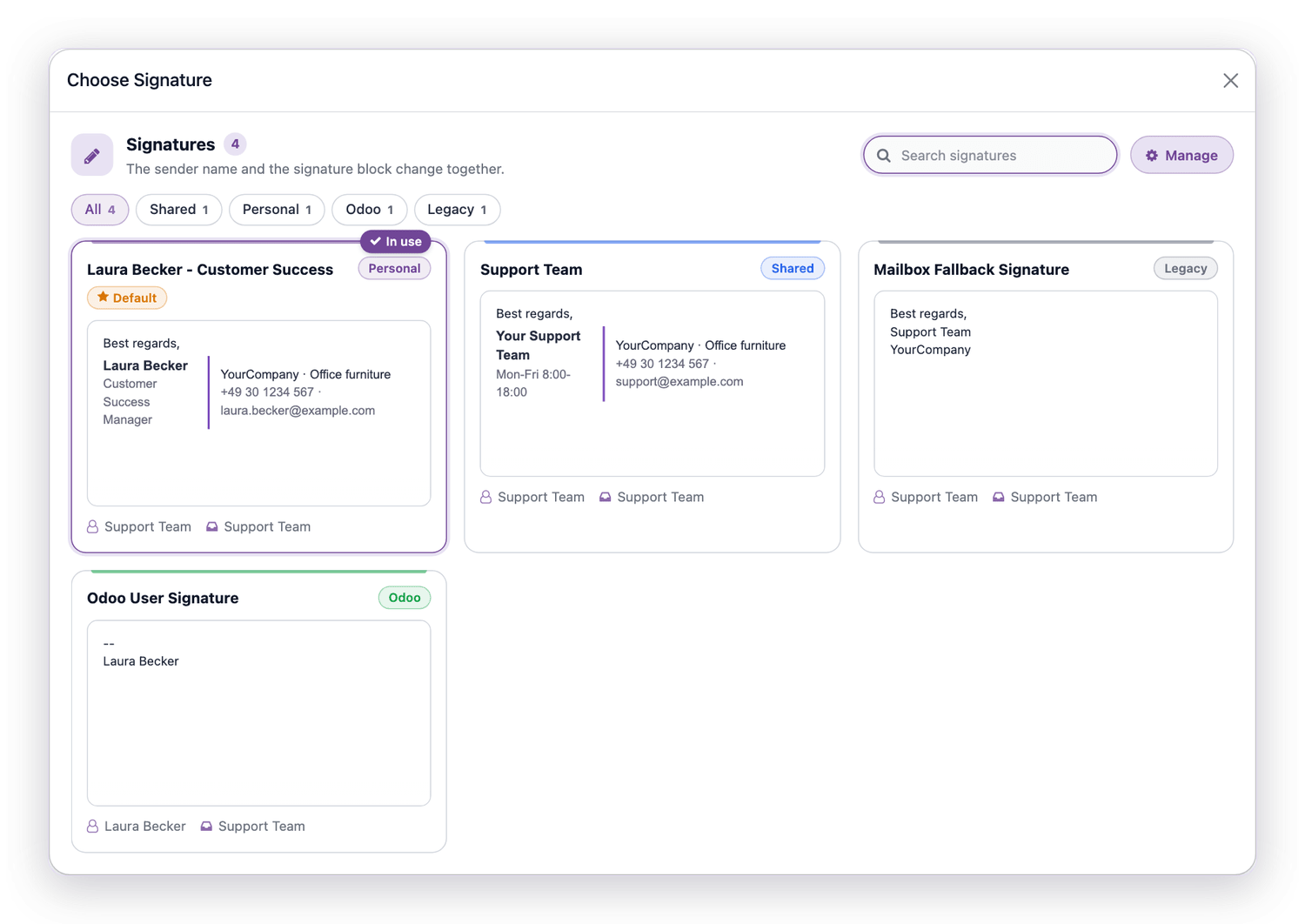
Choosing a signature

Signatures for every person and mailbox

Personal and shared signatures, each shown as the recipient will read it. The sender name changes together with the signature.

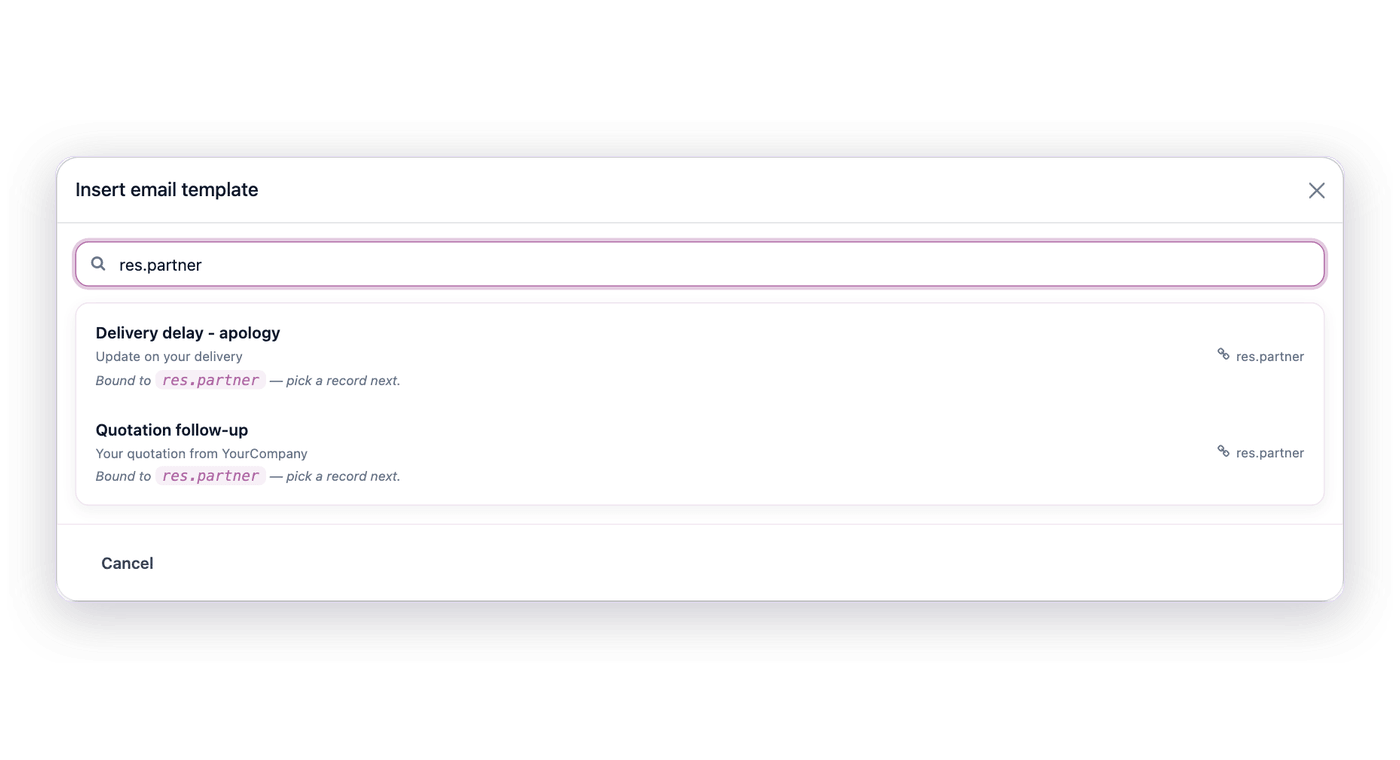
Inserting an email template

Odoo email templates

Search your templates by name, subject or model and insert one; templates written for a record ask which record to fill in.

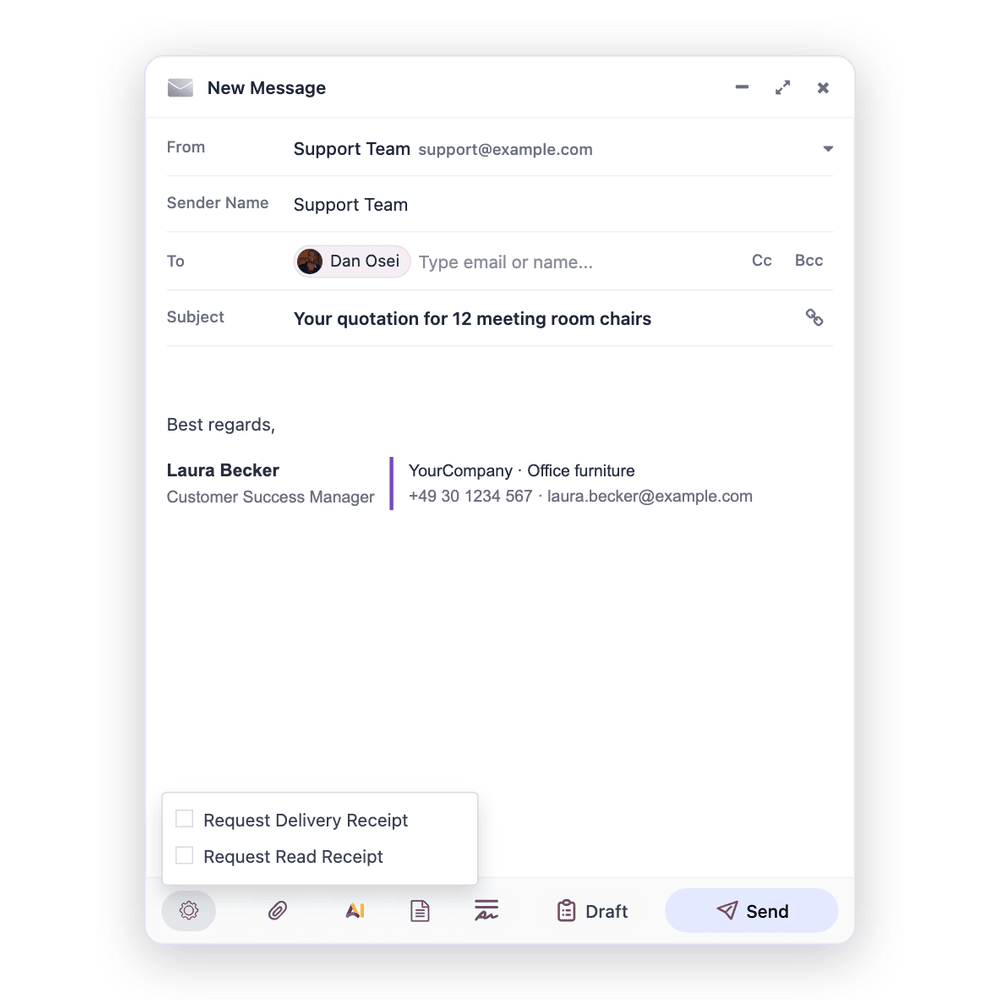
Asking for a delivery or read receipt

Delivery and read receipts

Ask for a receipt when it matters. Whether one comes back depends on the recipient’s mail system.

08PHONE & DARK MODE

Your inbox in your pocket

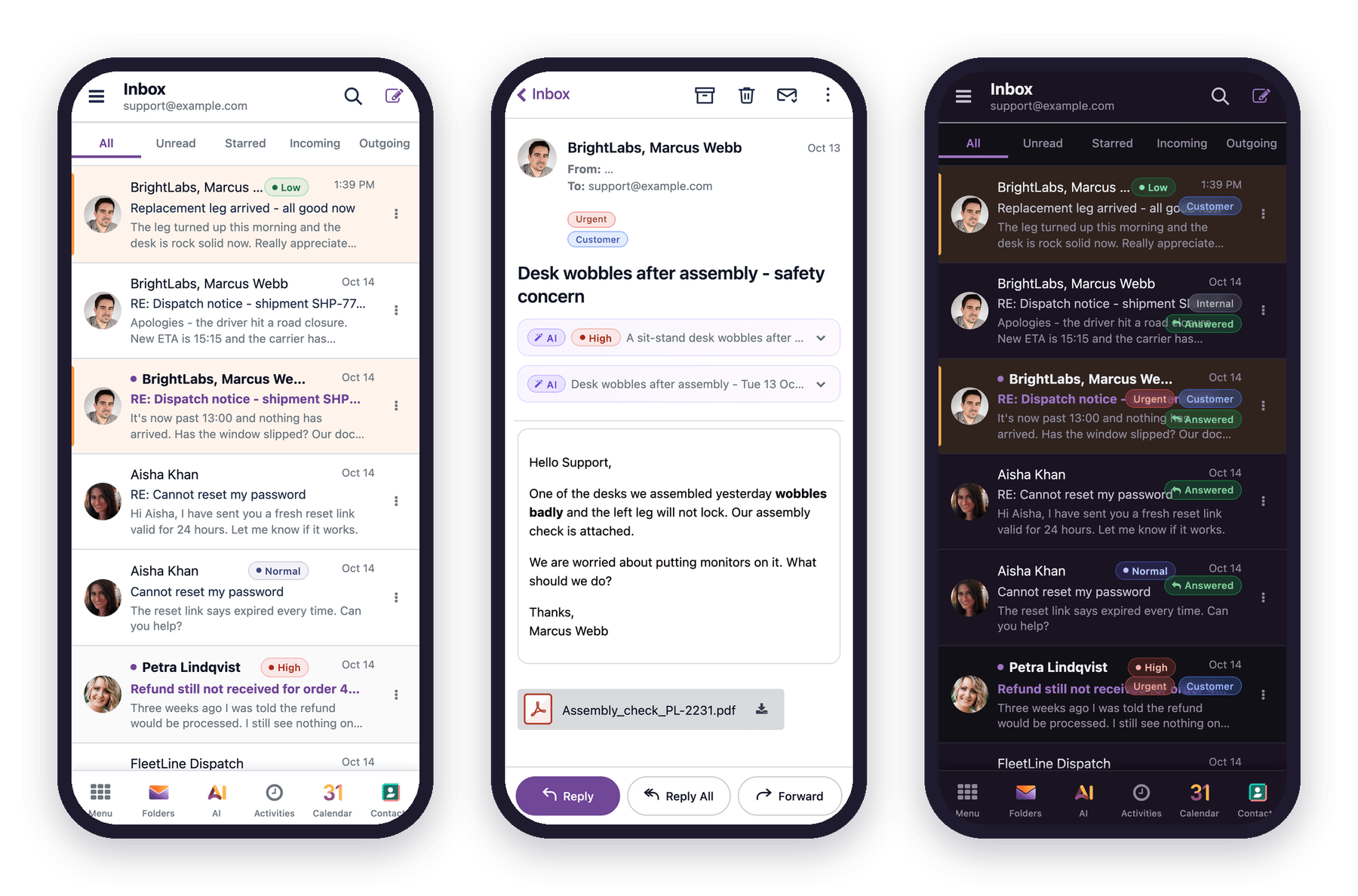
On a phone MailDesk looks and works like a mail app: a clear header, rows made for thumbs, a reading view with big buttons, and a bottom bar for folders, AI, activities and contacts. Light or dark, as Odoo is set.

MailDesk Pro on a phone in light and dark mode
MailDesk in Odoo dark mode

Easy on the eyes

When Odoo runs in dark mode (Odoo Enterprise), MailDesk follows, mail bodies included.

09SYNC & PUSH

One truth in Odoo and on the mail server

Pro carries your work to the mail server and brings new mail in as soon as the provider reports it.

✓  Read, unread, stars, moves and deletes go to the server through a queue that retries failed steps by itself

✓  Gmail push through Google Pub/Sub in your own Google Cloud project; Microsoft 365 push through Microsoft Graph. A wizard guides the setup, subscriptions renew automatically

✓  IMAP mailboxes that are in use get new mail through IMAP IDLE

✓  Unread mail per mailbox in Odoo’s top bar, one click from any app

Unread mail per mailbox in Odoo's top bar
10EVERYTHING IN PRO

All features at a glance

What MailDesk Pro adds to Basic, in one place.

Two-way sync & push icon

Two-way sync & push

Read & star syncMove & delete on serverSelf-healing queueGmail pushMicrosoft 365 pushIMAP IDLELive inbox check
MailDesk AI icon

MailDesk AI

Mail briefsThread digestSummariesReply draftsSearch by meaningWrite from a promptDaily prioritiesPhishing check
Your AI, your rules icon

Your AI, your rules

6 cloud providersYour own serverYour own API keyProvider per taskAI per mailboxBriefs on or offTone & team contextNever sends alone
Records icon

Records

One mail, many recordsA tile per Odoo appSearch all recordsLinked-count badgeShared or privateChatter replies count
Write icon

Write

Many signaturesSignature previewSender name per signatureOdoo templatesRead receiptsAI in the composer
Everywhere icon

Everywhere

Phone layoutDark modeTop-bar unreadAll of Basic

Basic, Pro or Business?

Each edition contains everything in the one before. The difference at a glance:

 BasicProBusiness
Mailboxes and usersunlimitedunlimitedunlimited
Receive and write email, conversations, filters, tags✓✓✓
Changes in both directions: read, moved, deleted—✓✓
AI: phishing check, summaries, reply drafts—✓✓
AI providers: OpenAI, Gemini, Claude, Mistral, Grok, DeepSeek or your own server—✓✓
Signatures, personal and shared—✓✓
Phone layout and dark mode—✓✓
Twelve Odoo integrations: Calendar, Chatter, CRM, Documents, Helpdesk, Inventory, Invoicing, Partner 360, Project, Purchase, Sales, Time Off——✓
Automation: rules, AI steps, rules in plain words——✓
Email support, Monday to Friday (CET)—answer within 2 daysanswer within 1 day
Phone support in German and English——✓
11THE MAILDESK SUITE

Add-on modules for the Odoo apps you use

Each add-on is a separate module that connects MailDesk with one Odoo app. They are sold in our shop; their AI features need MailDesk Pro.

MailDesk CRM
MailDesk CRM

Link mail to leads and opportunities; with Pro, the AI qualifies a lead from a mail.

View in the shop →
MailDesk Sales
MailDesk Sales

Link quotations and orders; with Pro, the AI drafts a quotation from a sales mail.

View in the shop →
MailDesk Helpdesk
MailDesk Helpdesk

Link mail to tickets and open a ticket from a mail (Helpdesk is an Odoo Enterprise app).

View in the shop →
MailDesk Project
MailDesk Project

Link mail to projects and tasks.

Included in MailDesk Business
MailDesk Calendar
MailDesk Calendar

Link meetings and invitations to the mail they came with.

View in the shop →
MailDesk Documents
MailDesk Documents

Attach files from Documents and file attachments into it (an Odoo Enterprise app).

View in the shop →
MailDesk Invoicing
MailDesk Invoicing

Link mail to customer invoices and vendor bills.

Included in MailDesk Business
MailDesk Purchase
MailDesk Purchase

Link requests for quotation and purchase orders.

Included in MailDesk Business
MailDesk Inventory
MailDesk Inventory

Link mail to transfers and deliveries.

Included in MailDesk Business
MailDesk Time Off
MailDesk Time Off

Create and link time-off requests from a mail.

Included in MailDesk Business
MailDesk Chatter
MailDesk Chatter

Discuss a mail with colleagues; with Pro, an AI brief turns it into a note or an activity.

View in the shop →
MailDesk Partner 360

A customer panel with everything about the contact, next to the mail.

View in the shop →
MailDesk Automation
MailDesk Automation

Rules per mailbox with an audit log; with Pro, describe a rule and the AI builds it.

View in the shop →
MailDesk Business — every add-on is also sold on its own; MailDesk Business bundles Pro, all twelve add-ons and the Automation Engine in one licence.
View MailDesk Business
12YOUR LICENCE

A monthly subscription

Every current and future Odoo version is covered: 17, 18, 19, 20 and the ones that follow.

✓  Minimum term twelve months, then cancellable monthly

✓  One licence per productive Odoo instance, for your whole team: no fees per user

✓  Metzler IT Software Licence (MOPL-1.0): you receive a right of use, the software remains the property of Metzler IT

✓  Email support Monday to Friday (CET), with an answer within 2 days

✓  Not included: Odoo itself, your email provider and external AI services

All editions and terms side by side: mit-odoo.de/pricing

Questions, answered

Does the AI send mail on its own?

No. The AI drafts and suggests. A mail leaves only when a person presses Send.

Is an AI subscription included?

No. You connect your own provider with your own API key, or your own server. Without a provider MailDesk Pro works as usual, just without the AI features.

Can the AI run without a cloud provider?

Yes. Choose “Custom / Local Server” and point MailDesk at a model you run yourself, for example with Ollama, LM Studio or vLLM.

Which mail does the AI read?

Only mail of mailboxes where AI is switched on. With automatic summaries on, new mail in the Inbox is briefed in the background; switch that off and the AI works only when someone asks. Mail goes from your Odoo to your provider, not through Metzler IT.

Can different tasks use different providers?

Yes. Summaries, reply drafts and the security check can each use their own provider; otherwise the active provider does everything.

Can Pro create leads, tickets or quotations from a mail?

With the add-on module for that app installed. By default the AI proposes the record and a person checks and confirms it.

What does push need?

For Gmail, a Pub/Sub topic in your Google Cloud project; for Microsoft 365, a Graph subscription that your Odoo can receive. The setup wizards walk you through it. Without push, mail still arrives on MailDesk’s schedule.

Do we still need Outlook or Gmail?

No. And if some colleagues keep using them, Pro keeps reading, moving and deleting in step on both sides.

Do I need to buy Basic too?

No. Pro contains everything in Basic and installs MailDesk Basic with it.

Where can I buy MailDesk Pro?

Right here in our shop. If you would like to see it first, ask us for a demo.

Which Odoo versions?

Odoo 17, 18, 19 and 20, Community and Enterprise, on your own server or Odoo.sh.

Let your inbox work for you

Questions before you buy? Write to us, we answer personally.

Metzler IT GmbH · Solution Partner in the BOP Alliance

Specifications

Version 20.0, 19.0, 18.0, 17.0