Users & permissions
You want the right people to use MailDesk - and you want a shared inbox like support@ or info@ to be visible only to the team that actually answers it. MailDesk makes that simple with just two roles and one access list per mailbox. This page explains, in plain language, who can do what, with the exact names you'll see in Odoo.
Available in: the MailDesk engine (Basic), so it works the same whether you run Basic or Pro. The two access groups and the per-mailbox access list are part of the engine; Pro features such as AI and signatures respect them automatically, with no extra setup.
Permissions in MailDesk come in two layers:
- Two MailDesk roles - they decide whether a person can use MailDesk at all, and whether they can also configure it.
- Per-mailbox access - for each mailbox you choose exactly which users may see and work in it.
Get these two right and everything else falls into place: everyday staff get a clean inbox, administrators get the setup screens, and no one sees mail that isn't theirs.
The two roles
MailDesk adds two roles under the MailDesk category in Odoo. You'll find them on each user's record at Settings → Users & Companies → Users → [user] → Access Rights, in the Other section:
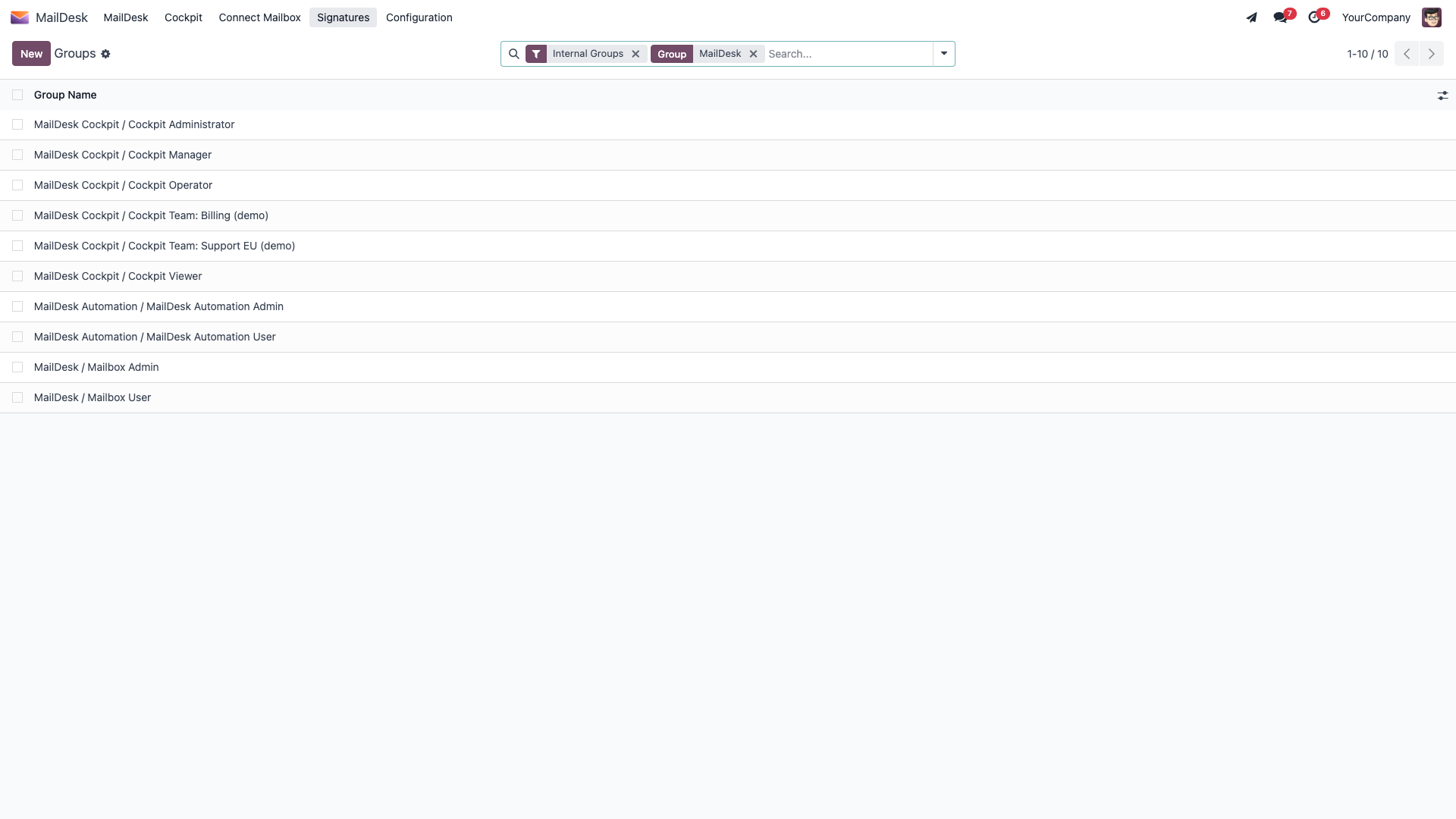
| Role | What it allows |
|---|---|
| Mailbox User | Use MailDesk day to day: open the inbox, read and reply, search, and organise with folders and tags - in the mailboxes that have been shared with them. They cannot connect new mailboxes or change MailDesk configuration. |
| Mailbox Admin | Everything a Mailbox User can do, plus the setup side: connect and edit mailbox accounts, decide who has access to each mailbox, and reach the Configuration menus. |
Think of it this way: Mailbox User is for everyone who works with email, and Mailbox Admin is for the one or two people who set MailDesk up and look after it.
Admin already includes User
A Mailbox Admin is automatically also a Mailbox User - you never assign both. Pick Mailbox User for everyday staff, and Mailbox Admin for the people who manage mailboxes.
Assign a role to a user
- Go to Settings → Users & Companies → Users and open the person.
- On the Access Rights tab, scroll to the Other section and find MailDesk.
- Set it to Mailbox User for everyday use, or Mailbox Admin for someone who sets up and manages mailboxes.
- Click Save.
The change applies straight away - the next time the user opens MailDesk, their new role is in effect.
Configuration is for administrators
The MailDesk → Configuration menus (including Mailboxes → Mailbox Accounts) appear only for Mailbox Admins. Mailbox Users see the inbox and their mail, but not the setup screens - so there's nothing for them to break.
Who sees which mailbox
Here's the important part: having the Mailbox User role lets a person use MailDesk, but it does not automatically show them every mailbox. Each mailbox account carries its own access list, so a shared inbox is visible only to the people you put on it.
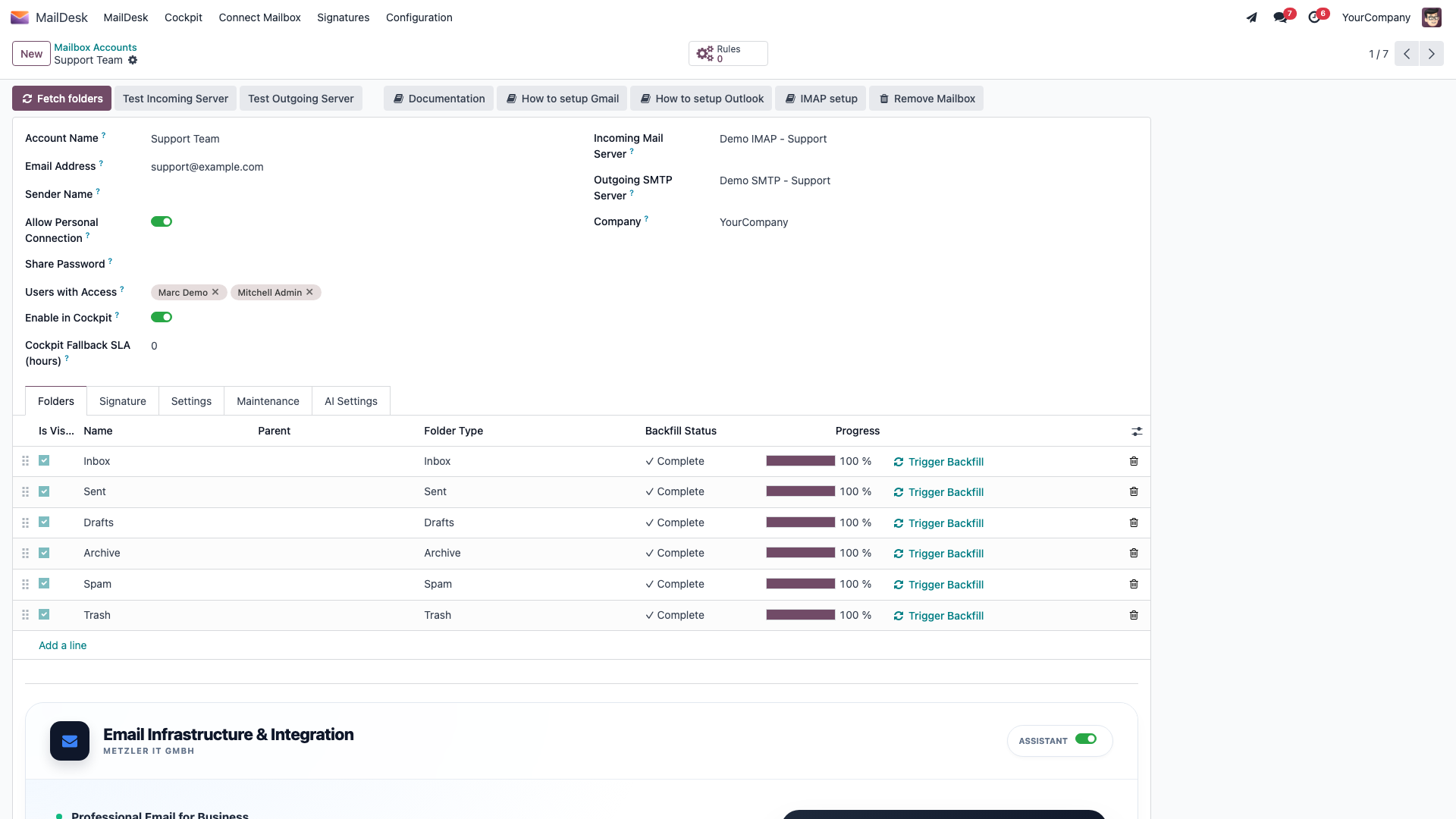
This is controlled on the mailbox account by the Users with Access field. A Mailbox User only ever sees the mailbox accounts where their name appears in that list - along with the folders, messages, drafts, and tags that belong to those mailboxes. A Mailbox Admin, by contrast, sees and can manage every mailbox account.
Personal vs shared mailboxes
For a personal mailbox, you typically add just its owner to Users with Access. For a shared mailbox, switch on Shared Mailbox and add every team member who should work in it. Everyone on the list sees the same mail - so your team can answer a shared inbox together, without forwarding anything around.
Choose who can access a mailbox
- Go to MailDesk → Configuration → Mailboxes → Mailbox Accounts and open the account (this needs the Mailbox Admin role).
- In the Users with Access field, add the Odoo users who should see and work in this mailbox.
- For a team inbox, also turn on Shared Mailbox.
- Click Save.
The change takes effect immediately: people you add can see the mailbox in MailDesk, and people you remove can no longer see it or its mail.
Removing someone removes their view of the mail
Taking a user off Users with Access removes their ability to see that mailbox and everything in it. It does not delete any mail - it only changes who can see it. To take a mailbox out of MailDesk entirely, use the Remove Mailbox button rather than deleting the account, so that any email already linked to your Odoo records stays intact.
How this keeps your mail safe
The per-mailbox access list isn't just a way of hiding things in the interface - it's enforced on the server by Odoo's record rules. A Mailbox User can only read the mailbox accounts, folders, messages, cached message bodies, read/unread state, drafts, and import queue that belong to mailboxes they're on the access list for. They can read and reply within those mailboxes, but they can't create or delete mailbox accounts. Mailbox Admins are the deliberate exception - they can see and manage everything, which is exactly why the Admin role should stay with the few people who actually run MailDesk.
There is no separate AI permission group. AI in MailDesk Pro reuses these same two roles, and an AI result is only ever shown for a mailbox you already have access to. Whether AI runs at all is governed by separate switches, including a per-mailbox Enable AI features toggle - see What MailDesk AI can and cannot access.